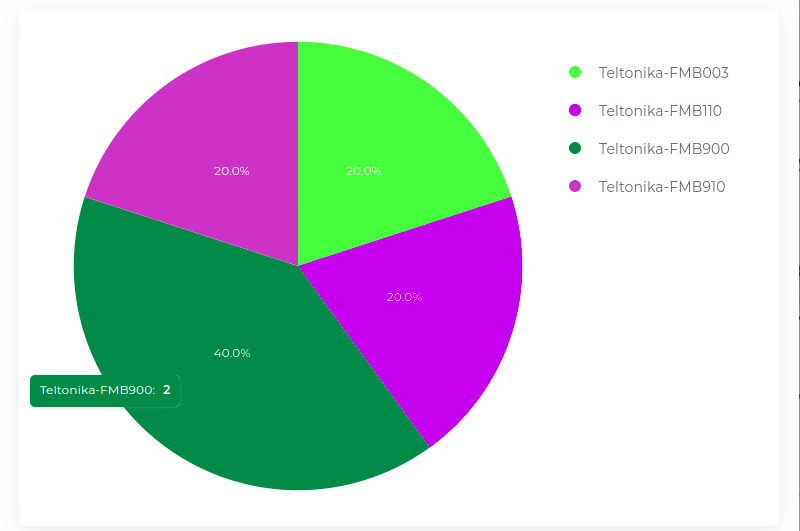
¶ Devices By Make and Model
¶ Key Features
-
Device Overview:
- Displays the manufacturer and model of each device associated with the current account, giving insight into device diversity and specifications.
-
Fleet Device Management:
- Helps users manage and track devices based on their make and model, ensuring compatibility and standardization across the fleet.
¶ How to Use the Devices By Make and Model Page
-
Navigate to Devices By Make and Model:
- Click on the Widgets and select Devices By Make and Model.
-
View Manufacturer and Model Details:
- The chart displays the manufacturer and model, helping users identify the distribution of different devices in their fleet.
-
Account-Specific Device Information:
- The data shown is specific to the current account, ensuring accurate device tracking for individual accounts.
-
Analyze the Percentage Factor:
- The percentage factor reflects the proportion of devices of a specific make and model relative to the total devices in the fleet. This helps users understand the dominance or scarcity of certain models, aiding in fleet standardization and management decisions.