¶ Overview
A sensor is a device that detects and measures specific physical, chemical, or biological properties. It converts this information into data that can be interpreted, stored, and acted upon by other devices or systems within the IoT network.
¶ Accessing Sensor Configuration
¶ Option 1: Adding a New Device
- Navigate to the Devices section in the left-side menu.
- Click on Add Device.
- After submitting the basic device information, the system will redirect you to the Sensor page.
¶ Option 2: Editing an Existing Device
- Go to the Devices section in the left-side menu.
- Select and edit any specific device.
- Click on the Sensor option to access the Sensor page.
¶ How To Add Sensors
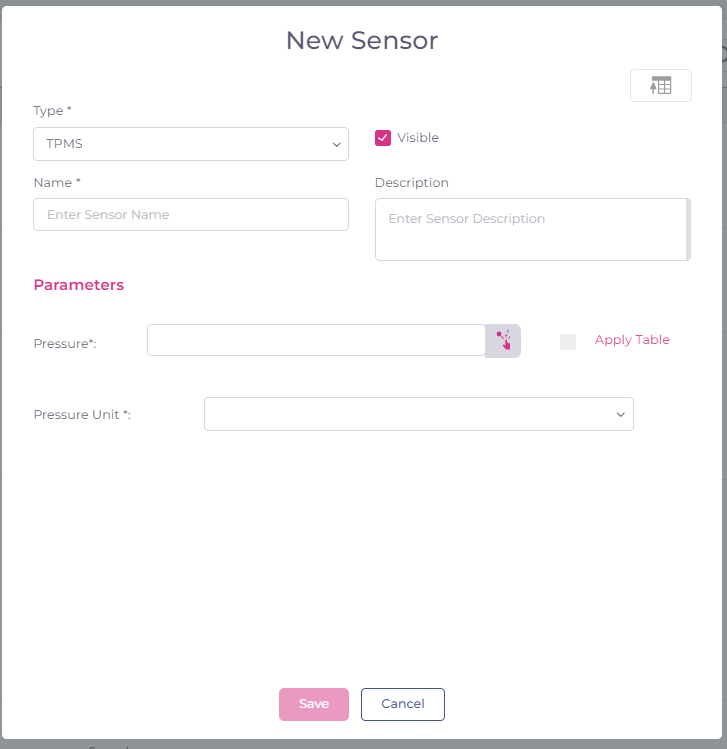
- Click on the Add sensor button.

- In the Sensor Type dropdown, select Sensor Type.
- Enter a descriptive name for the sensor. (Sensor name should be unique for specific device)
- Optionally, add a description for future reference.
- Check the Visibility checkbox if you want the sensor to be visible.
¶ Sensor Page Features
¶ Download Sensor
- Download Sensor: Click this option to download the sensor data in JSON format.
¶ Upload Sensor
- Upload Sensor: Use this option to upload sensors in JSON file format.
¶ Navigation
- Back Button: Click this button to return to the previous page.
- Preview Button: This button allows you to preview how the sensors will appear on the unit map screen.
¶ Visibility Control
- Visible Checkbox: If checked, the sensor will be displayed on the map. If unchecked, the sensor will not be visible.
¶ Apply Table
- Visible Checkbox: Use the Table option to apply the calculations. For more details, follow the link Using Calculation Table
¶ Expressions Parameters
- Visible Checkbox: For more details, follow the link Expressions Parameters
¶ Sensor Types in Polygon
Polygon supports a wide variety of sensors, including:
- Events
- GPS Sensor
- GSM Sensor
- Custom Sensor
- Speed Sensor
- Ignition Sensor
- Smart Bulb
- Power Unplug Event
- Engine Sensor
- Engine RPM
- Heartbeat
- Accelerometer
- Driver Behaviour
- Arbitrary Digital Sensor
- Weight Sensor
- Engine Hours Meter
- Odometer
- Video Stream (VIDEO_STREAM)
- Fuel
- AC
- Battery
- Relative Odometer
- Voltage
- Idling Sensor
- TPMS
- Temperature Sensor
These sensors allow for comprehensive monitoring and control within your IoT network, ensuring that all critical data points are captured and utilized effectively.
¶ Troubleshooting
- Configuration Settings: Ensure the sensor's settings (e.g., units, communication protocol) are correctly configured within polygon system's software.
- Communication Protocols: Ensure the sensor is using the correct communication protocol (e.g., Teltonika,Queclink) and that your system is correctly interpreting the data.
- Compatibility with System: Ensure that the sensor is compatible with the system's specifications and requirements, including voltage levels, data formats, and interfaces.
- Review Documentation: Consult the sensor’s datasheet, user manual, or technical documentation for troubleshooting guidelines specific to the sensor model.
¶ Additional Resources
For further assistance on configuring and managing sensors, refer to our Help Center or reach out to support.