One form adds an AI provider and edits one. To add one, in the side menu, select LLM Providers, then select Add provider. To edit one, select the Edit icon on its row. The key is stored encrypted and is never shown again. Only models that support tool calling can power the AI Assistant.
Every enabled key needs a monthly pool cap. A key needs a default model before it can be your default provider.
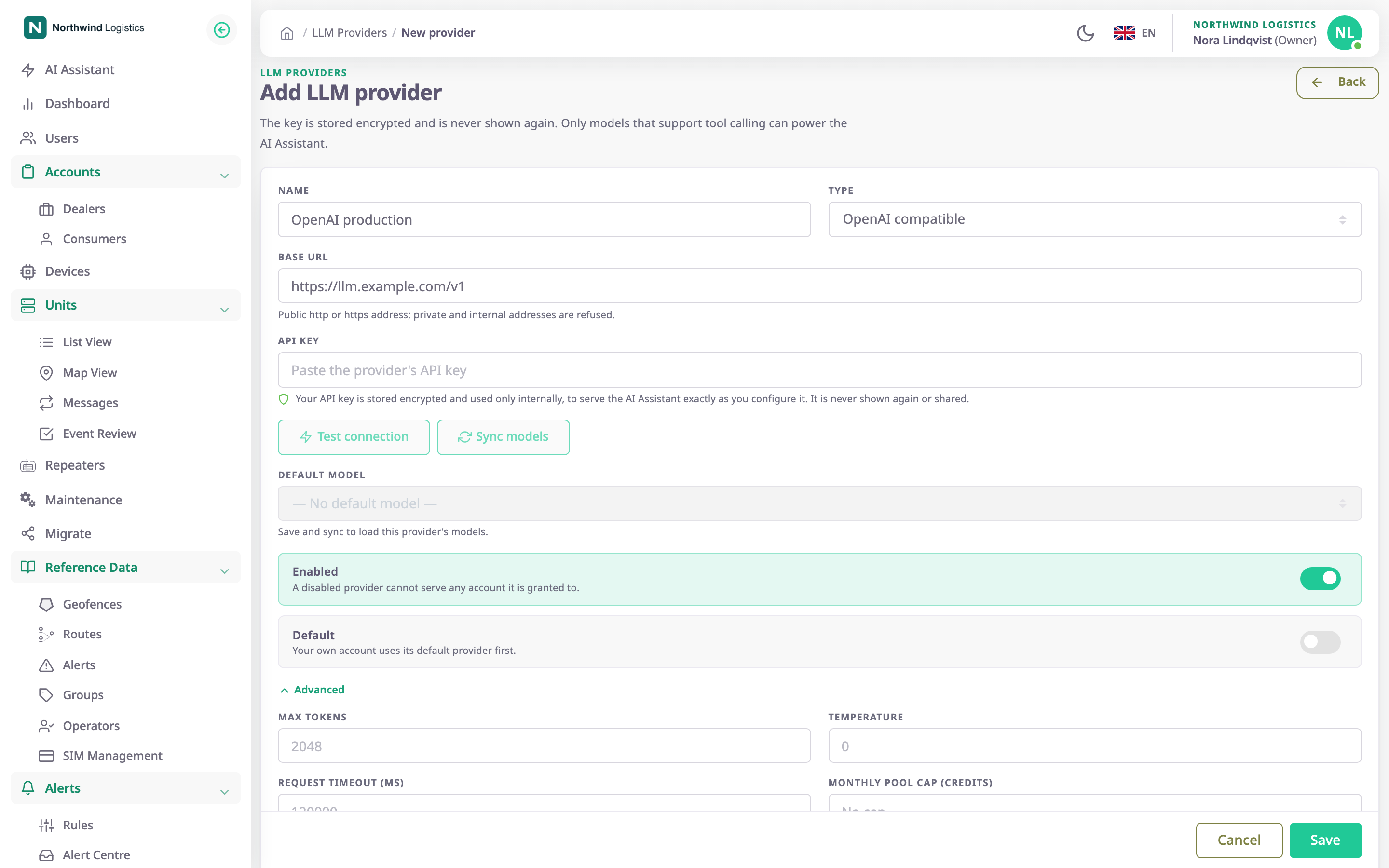
The page title is Add LLM provider, then the provider's name on an existing one. Back returns to the list.
¶ Before you start
- You need Edit on the AI provider module. Owner roles have it. Without it, the form opens read-only and shows only the end of the saved key.
- Have the provider's API key. For OpenAI compatible and Ollama, also have the server's address.
- The AI Assistant needs a model that supports tool calling. The form lists only those.
- Decide the monthly pool cap: the most credits all accounts billed to this key may use in a month, your own account included.
¶ Fields
| Field | Required | What it does | Allowed values / example | Notes |
|---|---|---|---|---|
| Name | Yes | Names the provider in your list and in the account form's provider list. | 1 to 120 characters. Example: OpenAI production | Unique among your own providers, ignoring capitals. |
| Type | Yes | Says which service the provider is. | OpenAI, OpenAI compatible, Anthropic (Claude), Google Gemini, Ollama | OpenAI by default. Changing it on a saved provider clears the default model and asks for the key again. |
| Base URL | Conditional | The address of the provider's API. | A full http or https address. Example: https://llm.example.com/v1 | Shows only for OpenAI compatible and Ollama, where it is required. The server refuses private and internal addresses. A plain http address shows a warning: the key and the conversations travel unencrypted. |
| API key | Conditional | The key the provider issued you. | At least 8 characters, no spaces. | Required for a new provider, except Ollama, which usually needs no key. On a saved provider, leave it empty to keep the saved key. A new type or base URL needs the key again. |
| Monthly pool cap (credits) — required | Yes, while Enabled is on | The most credits all accounts billed to this key may use in a month, your own included. | A whole number from 1 to 100000000. Example: 25000 | When used up, their AI requests are refused until next month. |
| Default model | Conditional | The model accounts use unless they pick another. | A model from the list, or none | Required before you turn on Default. Unavailable on a new provider and after you change the endpoint. Save, then select Sync models. Clearing it turns Default off. |
| Check a hidden model | No | Tests a model the list hides, with one small tool-calling request. | A model id without spaces. Example: my-finetune-v2 | Shows on a saved provider that has hidden models. A model that passes joins the list. |
| Enabled | No | Lets the provider serve accounts. | On or off | On by default. A disabled provider serves none of the accounts it is granted to. |
| Default | No | Makes this the provider your own account uses first. | On or off | Off by default. Unavailable while the provider is disabled or has no default model. Only one provider is the default. |
¶ Advanced settings
Select Advanced to open these. Leave them empty to use the platform's settings.
| Field | Required | What it does | Allowed values / example | Notes |
|---|---|---|---|---|
| Max tokens | No | The most tokens one answer may use. | A whole number from 1 to 200000 | — |
| Temperature | No | How varied the answers are. Lower is steadier. | 0 to 2, decimals allowed | — |
| Request timeout (ms) | No | How long the app waits for the provider to answer one request. | Whole milliseconds, 1000 to 600000 | Milliseconds: 120000 is two minutes. |
¶ Keys saved before the cap was required
A key saved without a pool cap, or a default key without a default model, still serves accounts. The LLM Providers list tags it Needs setup, and the form shows a yellow banner that says what is missing:
- No pool cap: the key is held to the platform default number of credits a month, shared by every account billed to it. The banner names that number.
- No default model on your default key: choose one.
You cannot save any change to such a key until you fill in what the banner names.
¶ Buttons and actions
| Action | What happens |
|---|---|
| Test connection | Connects to the provider with the type, address and key on the form. The app shows "Connected." and the number of models, or the reason it failed. It also tests the default model on a saved provider. Unavailable until the type, address and key are valid. |
| Sync models | Loads the provider's model list and sorts it. The app shows how many models support tool calling. Available on a saved provider only. |
| Check tool support | Tests the model in Check a hidden model. |
| Save | Saves the provider and shows "Provider saved". A new provider stays open as an existing one, so you can sync its models. |
| Cancel | Returns to the list without saving. Read-only users see Back instead. |
¶ Save and test
- Fill in Name, Type, the address if it shows, API key and Monthly pool cap (credits) — required.
- Select Test connection.
A line beside the buttons says whether the provider answered. - Select Save.
The app shows "Provider saved". The form stays open. - Select Sync models.
The line says how many models were found and how many support tool calling. - In Default model, choose a model.
- Optional: turn on Default to make this your own account's first provider.
- Select Save again.
To let an account use the provider, grant it in the AI Assistant section of that account's form.
¶ Troubleshooting
| Message | Cause and fix |
|---|---|
| "Name already in use" | Another of your providers has this name. Choose another. |
| "API key required" | A new provider needs its key, and a changed type or address needs it again. |
| "This model does not support tool calling, so the AI Assistant cannot use it." | The default model cannot answer through the assistant. Sync the models and choose one from the list. |
| "The AI provider did not accept the API key." | The key is wrong or has expired. Enter it again. |
| "The AI provider could not be reached." | Check the address and that the server is online. |
| "A disabled provider cannot be the default." | Turn on Enabled, or turn off Default. |
| "Monthly pool cap required" | Enter a pool cap of 1 credit or more. Every enabled key needs one. |
| "Default model required" | Sync the models and choose a default model before you turn on Default. |
| "Default model in use" | You cleared the default model, but some accounts run on it. The message names them. Choose another default model, or first give those accounts a model of their own in their account form. |
| "API keys cannot be stored because AI_SECRET_KEY is not configured on the server." | A server setting is missing. Contact your administrator. |
¶ Permissions
- Read on the AI provider module opens the form read-only. Edit lets you change, test, sync and save.
- You can only change providers your own account owns. A provider passed down from a parent account does not open for editing.