A condition is an expression that tests something and gives one value when the test holds and another when it does not. {status}>0 ? 1 : 0 reads "if status is above 0, then 1, else 0". Conditions let one sensor field turn a raw code into a clear state, or depend on another sensor. You write them in the expression, or with the condition builder on the Conditional tab of the sensor field's dialog.
¶ When to use one
- A code means a state. A door contact sends 0 for closed and 2 or 4 for open:
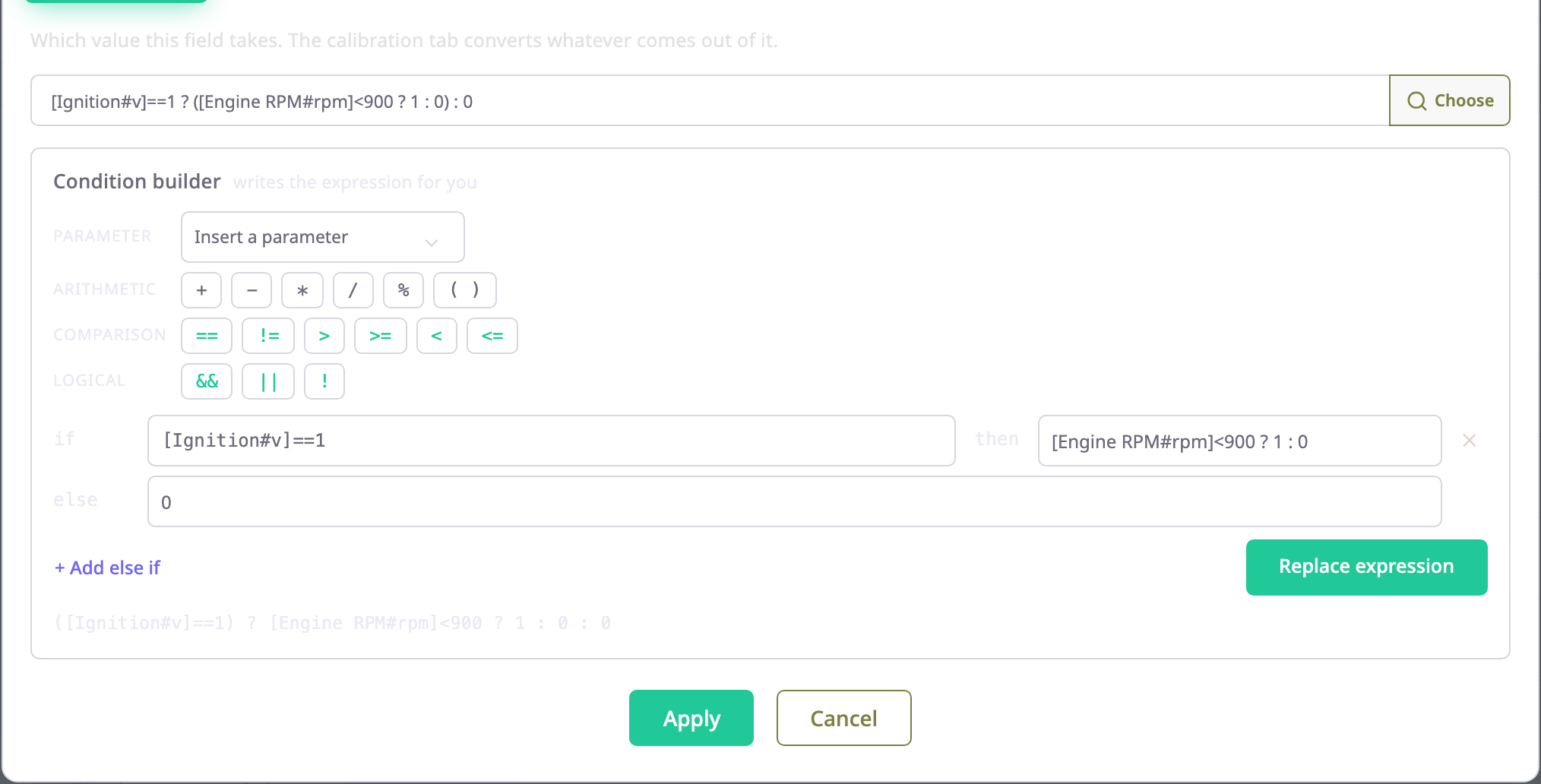
{status}>0 ? 1 : 0turns every open code into 1. - A value only counts in some situations. Idling is "ignition on and engine slow":
[Ignition#v]==1 ? ([Engine RPM#rpm]<900 ? 1 : 0) : 0. - Several ranges map to levels.
{load} > 80 ? 2 : ({load} > 40 ? 1 : 0)gives three load levels. - A reading only matters in some states.
{in4} == 1 ? {can_rpm} : 0reports engine speed only with the ignition on. Do not do this with a fuel level: the else value reads as an empty tank. To drop bad readings, use bounds; see Calibration tables.
A condition always gives a number. The test itself is true or false, and the app refuses to save a field whose result can be true or false. Write <test> ? 1 : 0 to turn a test into 1 or 0.
¶ How the app evaluates a condition
On every message the device sends, the app computes each field in this order:
- It reads the parameters and the other sensors the field names.
- It runs the tests from left to right and takes the value of the first test that holds. If none holds, it takes the last value, the "else" value.
- It converts that value with the field's calibration table, if the field has one.
- It checks the lower and upper bounds and discards a value outside them. With Apply after calculation off, the default, this check runs on the value before step 3.
A chain of conditions, a ? x : (b ? y : z), reads as "if a, then x; else if b, then y; else z". The condition builder writes and reads chains in exactly this form, one row per test.
Watch what happens when a message does not carry a value the test needs:
| Test | Parameter missing from the message | Result |
|---|---|---|
{in4} == 1 ? 1 : 0 |
== and != treat it as not equal |
The else value, 0 |
{status} > 0 ? 1 : 0 |
>, >=, <, <= need a number |
No value for that message |
[Ignition#v] == 1 ? 1 : 0 |
A referenced sensor with no value | No value for that message |
{in4} == 1 ? {fuel_lvl} : 0 |
The value of the branch the test picks | The else value, 0 |
[Ignition#v] == 1 && {in4} == 1 ? 1 : 0 |
A parameter the app reaches, in an expression that also reads a sensor | No value for that message. With the ignition off, the app stops at the first test and gives 0. |
The fourth row matters for readings such as fuel. When the test holds but the chosen value is missing, the app takes the else value. A fuel field written that way reads 0 litres instead of nothing, which can look like a drain. Put a reading you rely on in the test as well, or leave the condition out and use bounds.
¶ Conditions and calibration tables
The calibration table converts whatever the condition returns. Someone measured its points against the value the field produced at the time. A condition added later changes which value that is, and the table would then convert the wrong numbers. So the app keeps the order strict:
- Take a field that has a calibration table and no condition in its saved expression. Its Conditional tab shows "This field is calibrated, so conditions are locked" and hides the condition builder.
- Clear calibration table on that tab removes the table and the measured points, and unlocks the builder. Add the condition and calibrate the field again.
- If you type a condition into the field instead, the hint says "This field already has a calibration table. Clear the table before adding a condition, then calibrate again." The server refuses the save with "Calibration table already set".
- The app allows the other order: a field whose saved expression already has a condition can get a calibration table. On a new sensor or a new field, save the condition first. The server refuses a condition and a table that arrive in the same save.
¶ Conditions that read other sensors
A test can read any field of another sensor on the same device, written [Sensor name#field]. It gets that field's final value, after its own expression, calibration and bounds. The app computes the other sensor first. Two sensors cannot read each other: the hint names the loop and Save stays off.
Tests may mix sensor references and parameters: [Engine RPM#rpm] > 300 ? {in4} : 0.
¶ Examples
These conditions run on the demo devices.
| Sensor and field | Condition | Reads as |
|---|---|---|
| Cargo door | {status}>0 ? 1 : 0 |
If the status code is above 0, then 1 (open), else 0 (closed). |
| Idling | [Ignition#v]==1 ? ([Engine RPM#rpm]<900 ? 1 : 0) : 0 |
If the ignition is on: 1 when the engine runs under 900 rpm, else 0. With the ignition off: 0. |
| Driver behaviour, harsh braking | {event_code}==1 ? 1 : 0 |
If the event code is 1, then 1, else 0. |
¶ Next steps
- Conditional tab: the builder, the lock and how to add a condition.
- Expression reference: every operator and the save errors.
- Calibration tables