An expression is the text in a field of the Telemetry mapping group of the sensor dialog. It tells the app how to compute that field from each message the device sends. This page lists everything an expression may contain. For what expressions are for and when to use one, see Sensor expressions.
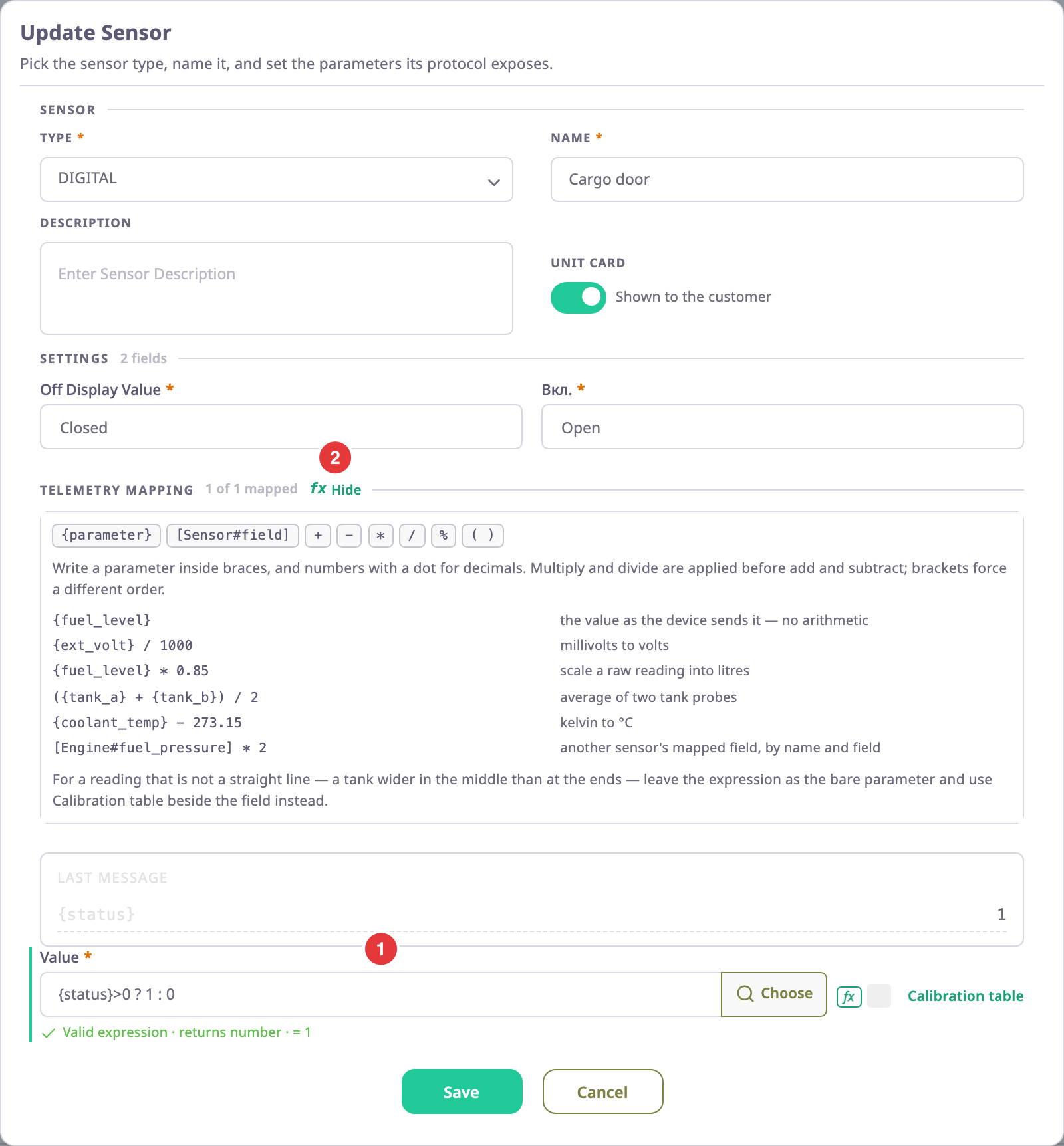
¶ Syntax at a glance
| Part | Write it as | Example |
|---|---|---|
| Protocol parameter | The parameter key in braces | {in4} |
| Another sensor's field | Sensor name and field key in square brackets, joined by # |
[Ignition#v] |
| Number | Digits, with a dot for decimals | 37.5 |
| Arithmetic | + - * / % |
{ext_volt} / 1000 |
| Comparison | == != > >= < <= |
{status} > 0 |
| Logic | && (and), \|\| (or), ! (not) |
{speed} < 4 && {in4} == 1 |
| Choice | test ? value if true : value if false |
{status} > 0 ? 1 : 0 |
| Grouping | Round brackets | ({adc} * 15) - 37.5 |
Spaces between parts are optional. The app refuses anything else, such as words, units, quotes or other brackets.
¶ Parameter references
A parameter reference reads one value from the message the device sent. Write the parameter key exactly as the device's protocol names it, inside braces: {fuel_lvl}, {can_rpm}.
- The key may contain letters, digits, underscores and dots. A dot reads a value nested inside another parameter. It cannot read a position in a list:
{loc.coordinates.0}gives no value. - The key must be one the device's protocol lists, or one the device sent in its last message. If it is neither, the hint under the field says "{parameter} is not in this device's protocol". It also suggests the closest key from the protocol or the last message.
- Many protocols list a numbered family as one entry, such as
input_status_Xortrouble_codes_codeN. Any number in its place counts:{input_status_3}is a known key. When the entry's description gives an ID range, the number must fall inside it. - A key with no braces is not a parameter. The app refuses
fuel_lvl * 0.85and accepts{fuel_lvl} * 0.85. - Choose beside the field opens Choose a parameter, which lists the protocol's parameters and inserts the one you pick at the cursor.
¶ Sensor references
A sensor reference reads the final value of a field of another sensor on the same device. Write the sensor's name and the field key, joined by #, inside square brackets: [Engine RPM#rpm].
- The name must match the other sensor's Name exactly. It may contain letters of any alphabet, digits, spaces, hyphens and underscores. You cannot reference a sensor whose name has other characters, such as brackets or a dot.
- The field key is the key of that sensor's field, in Latin letters, digits, hyphens and underscores. Always write it:
[Ignition]alone reads nothing. - The reference reads the other field after its own expression, calibration table and bounds.
[Fuel tank#level]gives litres, not raw probe counts. - A sensor cannot read itself, and two sensors cannot read each other. The hint names the loop, for example "Cyclic dependency detected: Idling -> Ignition -> Idling".
¶ Numbers and value types
A parameter value is a number, text or true/false, depending on how the device's protocol sends it.
- Arithmetic and the comparisons
>,>=,<and<=need numbers on both sides. Text or a missing value there gives the field no value for that message. +is the exception for text: it joins the two sides as text. If the device sendslevelas the text "12",{level} + 1gives 121, not 13. Use a parameter that arrives as a number.==and!=compare anything, but text never equals a number:{in4} == 1is false when the device sends the text "1".- A bare reference such as
{in4}passes the value through unchanged. The app reads numeric text such as "1" as a number later, so a bare reference works with text values too. - Write numbers with digits and an optional decimal part:
0.85, not.85,0,85or8.5e-1. Write a negative number with a minus sign:-37.5.
¶ Operators and precedence
The app works out an expression in this order, from first to last. Brackets change the order.
| Order | Operators | Meaning |
|---|---|---|
| 1 | -x, !x |
Negative value; not |
| 2 | *, /, % |
Multiply, divide, remainder after division |
| 3 | +, - |
Add, subtract |
| 4 | >, >=, <, <=, ==, != |
Compare two values; the result is true or false |
| 5 | && |
True when both sides are true |
| 6 | \|\| |
True when either side is true |
| 7 | ? : |
Choose between two values |
Write one comparison at a time: 0 < {x} < 10 does not work. Join comparisons with && instead: {x} > 0 && {x} < 10.
¶ Conditional expressions
A conditional expression picks one of two values with test ? value if true : value if false. Chain them to pick from several: {x} > 100 ? 2 : ({x} > 50 ? 1 : 0).
- The test must be a comparison or a logic expression. A plain number or reference before
?gives no value. - Both branches must give numbers. If the result can be true or false, the app refuses the sensor on save with "Expression must return a number". Wrap a test as
<test> ? 1 : 0to turn it into 1 or 0. - The condition builder on the Conditional tab writes these chains for you. See Sensor conditions and Conditional tab.
¶ Functions
Expressions have no functions. The fields accept convertToInt({param}, base), and the hint even shows a value for it. The server that computes sensor values has no such function, though. A field that uses it gets no value. Use a parameter that already arrives as a number, or ask the device's installer to change what the device sends.
¶ What the app checks before it saves
The hint under the field checks the expression as you type. Save in the sensor dialog stays off while a mapped field is not valid.
| Hint or message | Meaning | Fix |
|---|---|---|
| "A bracket is still open — close it before this can be saved" | A {, [ or ( has no closing partner. |
Close the bracket. |
| "{parameter} is not in this device's protocol" | The key in braces is not one of the device's parameters, and the device's last message does not have it either. | Use the key the hint suggests after "Closest match", or pick one with Choose. |
| "This device has no [Sensor#field] — check the sensor name and field." | No sensor on this device has that name and field. | Correct the name or field key. |
| "Invalid expression: consecutive operators are not allowed." | Two operators in a row, such as * /. |
Remove one. |
| "Expression contains unrecognized identifiers." | A word outside braces or brackets. | Put parameter keys in braces. |
| "Leading + or - with a single variable reference is not allowed." | The whole field is -{x} or +[A#b]. |
Write 0 - {x}. |
| "This returns true or false, so the sensor reports nothing. Wrap it as: ? 1 : 0" | The result is a comparison, not a number. | Add ? 1 : 0. |
| "A condition over constants never evaluates. Reference a protocol parameter or another sensor." | The test uses only numbers. | Reference a parameter or a sensor. |
| "Valid expression · returns number · = 12.6" | The expression is valid. The number is what the device's last message gives. | — |
If an expression gets past the hint, the server checks it again on Save. For the cases above it refuses the sensor with "Expression must return a number", "Condition references nothing" or "Calibration table already set". It shows "The {field} filed value is invalid in {name}" for most other syntax errors. The last one also covers ^, **, ?? and square brackets without #, which the server does not accept.
¶ When an expression gives no value
The app computes every mapped field again for each message. A field has no value for a message, and the unit card and reports show nothing for it, when:
- A parameter in arithmetic or in
>,>=,<,<=is missing from the message or arrives as text. - A referenced sensor field has no value itself.
- The test of
? :is not true or false. - The expression also reads another sensor, and the app reaches a parameter that is missing from the message. This holds even inside
==and!=. - The expression uses
convertToInt. - The result falls outside the field's lower or upper bound. See Calibration table dialog.
A missing parameter inside == or != is different: the comparison is false, so a condition takes its "false" branch. {in4} == 1 ? 1 : 0 gives 0 when the message has no in4, but {in4} > 0 ? 1 : 0 gives no value.
A missing value in the branch a test picks also falls through to the else value. {in4} == 1 ? {fuel_lvl} : 0 gives 0 when the ignition is on and the message has no fuel_lvl.
If two sensors read each other, the app cannot order them and computes no sensor of that device. The hint blocks this when you edit in the app; check sensor files you upload.
¶ Worked examples
These expressions run on the demo devices.
| Sensor | Field expression | What it does |
|---|---|---|
| Ignition | {in4} |
Passes digital input 4 through: 1 with the ignition on, 0 with it off. |
| Cargo door | {status}>0 ? 1 : 0 |
Turns any status above 0 into 1 (open) and everything else into 0 (closed). The sensor shows its own on and off texts for 1 and 0. |
| Cargo temperature | ({adc}*15)-37.5 |
Scales the analogue input into °C: a reading of 2.5 gives 0 °C, and 3 gives 7.5 °C. |
| Idling | [Ignition#v]==1 ? ([Engine RPM#rpm]<900 ? 1 : 0) : 0 |
Reads two other sensors: 1 when the ignition is on and the engine runs under 900 rpm, otherwise 0. |
| Power supply | {ext_volt} |
Passes the external voltage through. If a device reports millivolts, write {ext_volt} / 1000. |
¶ Limits
- One expression per field; no line breaks, comments or variables.
- No functions, text values or units inside the expression. Units belong in the sensor's own settings.
- A sensor reference reads fields of sensors on the same device only.
- Square-bracket references and parameters can share one expression, for example
[Engine RPM#rpm] > 300 ? {in4} : 0.