This page lists every permission you can give a role on step 2 of the role wizard. A consumer account's roles can hold 129 permissions in 26 modules; a dealer account's roles 158 in 32 modules.
¶ How to read this table
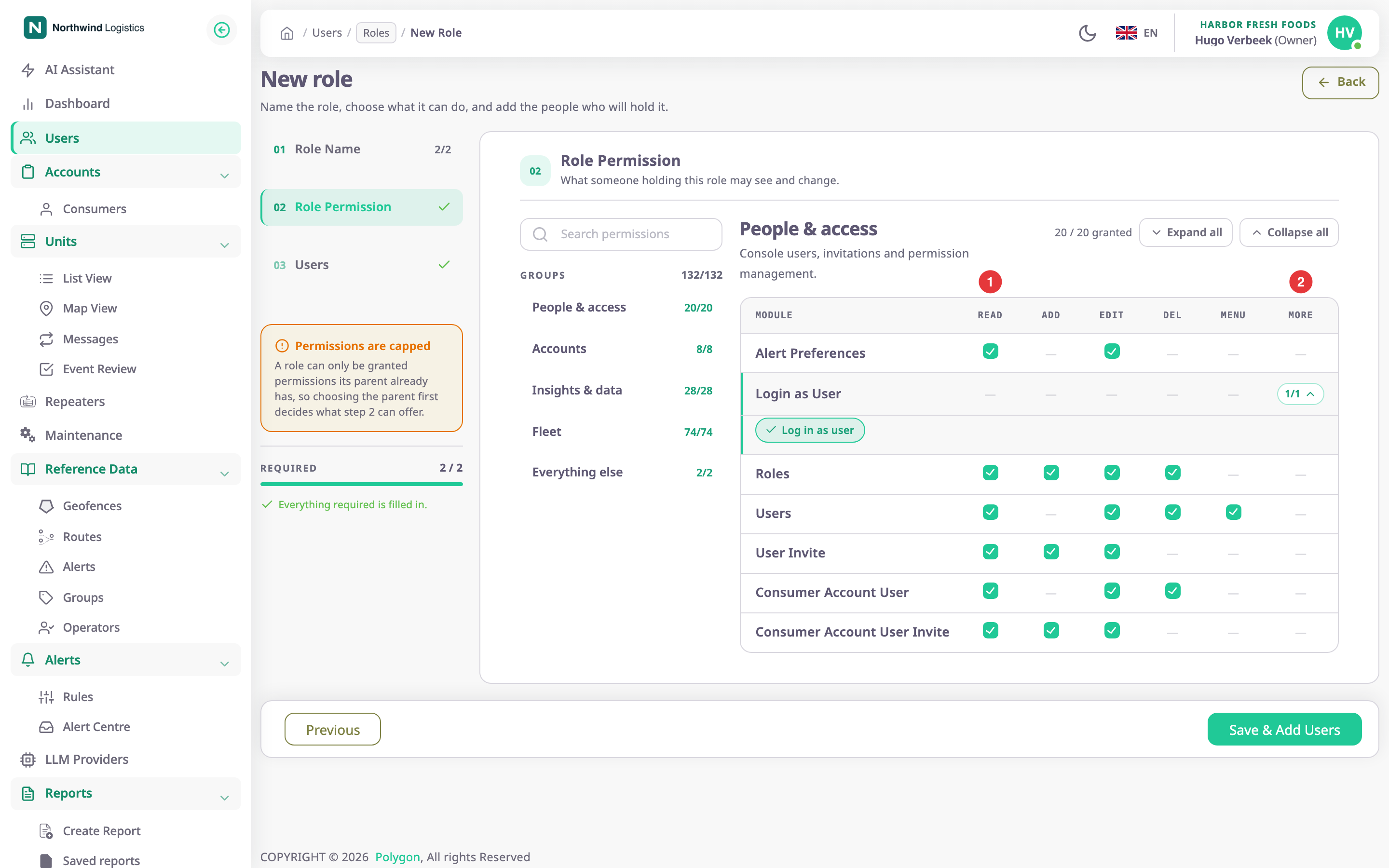
Each module is one row. The columns Read, Add, Edit, Del and Menu, marked 1, are the common actions; a dash means the module does not have that action. More, marked 2, opens actions that only that module has.
In the tables below:
- Actions lists the column actions the module has.
- More lists the extra actions, with the names the wizard shows.
- Dealer only marks modules and actions a consumer account's roles never see.
A role can only hold what its parent role holds. See How roles and permissions work.
¶ People & access
| Module | Actions | More | Dealer only |
|---|---|---|---|
| Alert Preferences | Read, Edit | — | — |
| Login as User | — | Log in as user | — |
| Roles | Read, Add, Edit, Del | — | — |
| Users | Read, Edit, Del, Menu | — | — |
| User Invite | Read (Read), Add (Send), Edit (Resend) | — | — |
| Consumer Account User | Read, Edit, Del | — | — |
| Consumer Account User Invite | Read (Read), Add (Send), Edit (Resend) | — | — |
| Dealer Account User | Read, Edit, Del | — | Yes |
| Dealer Account User Invite | Read (Read), Add (Send), Edit (Resend) | — | Yes |
Users and User Invite are about your own account. The Consumer Account User and Dealer Account User modules are about the users and invitations of the accounts below yours.
¶ Accounts
All account actions sit under More.
| Module | More | Dealer only |
|---|---|---|
| Consumer Accounts | Read Consumer Accounts, Add Consumer Accounts, Update Consumer Accounts, Read Consumer Sub Accounts, Add Consumer Sub Accounts, Update Consumer Sub Accounts, Show Consumer Menu, Show Dashboard | Show Dashboard appears here only for consumer accounts |
| Dealer Accounts | Read Dealer Accounts, Add Dealer Accounts, Update Dealer Accounts, Read Dealer Sub Accounts, Add Dealer Sub Accounts, Update Dealer Sub Accounts, Show Dealer Menu, Show Dashboard | Yes |
The plain actions apply to the accounts directly below yours. The Sub Accounts actions apply when you have drilled down into a child account and work with its accounts.
¶ Insights & data
| Module | Actions | More | Dealer only |
|---|---|---|---|
| AI Assistant | Read (Use AI Assistant), Edit (Manage AI Assistant Settings), Menu | — | — |
| Dashboard Widgets | Read, Add, Edit, Del | Show Dashboard, Consumer Dashboard Sub Accounts | — |
| Reports | Read (Read template), Add (Add template), Edit (Update template), Del (Delete template), Menu | Sub accounts report generate, Import template, and one action per report data source: Trips & parkings, Engine & ignition sessions, Mileage & engine-hour counters, Fuel events, Device & sensor events, Driver behaviour, Driver assignments, Route rides & checkpoints, Geofence visits, Calculated section, Data coverage | — |
| Import/Export | Read, Menu | Import, Export | Yes |
| Migrations | Edit (Data Migrate), Menu | — | Yes |
A report data source action lets the role build and run reports from that kind of data.
¶ Fleet

| Module | Actions | More | Dealer only |
|---|---|---|---|
| Alert Incidents | Read, Edit, Menu | — | — |
| Alert Deliveries | Read | — | — |
| Alert Quotas | Read | — | — |
| Alert Rules | Read, Add, Edit, Del, Menu | Alert Sub Account | — |
| Alert Templates | Read | — | — |
| Alerts | Read, Add, Edit, Del, Menu | Alert Sub Account | — |
| Devices | Read; for dealers also Add, Edit, Del, Menu | Modify Card Order, Execute Command, Execute Command Log History, Execute Webhook | Add, Edit, Del, Menu |
| Geofences | Read, Add, Edit, Del, Menu | Geofence Sub Account | — |
| Labels | Read, Add, Edit, Del, Menu | Labels Sub Account | — |
| Operators | Read, Add, Edit, Del, Menu | — | — |
| Repeaters | Read, Add (Manage Repeaters), Menu | Repeaters Sub Account | — |
| Routes | Read, Add, Edit, Del, Menu | Routes Sub Account | — |
| Maintainance | Read, Add, Edit, Del, Menu | Notification Settings | — |
| SIMS | Read, Add, Edit, Del, Menu | Recharge Manage | Yes |
| Configurators | Read, Add, Edit, Del, Menu | Send Configurator | — |
| Units | Read, Add, Edit, Del, Menu | Show Events, Show Trips, Show Videos, Show Activities, Show History, Show Services, Show Messages | — |
Labels is the module behind groups. Alerts is the legacy alerts module; current alerting uses Alert Rules, Alert Incidents and the other alert rows. The module name Maintainance is spelt that way in the app.
Actions whose name ends in Sub Account add an account picker to the module's list. With it, the role can also see the records of accounts below yours.
¶ Permissions only dealer accounts have
| Group | Module or action |
|---|---|
| People & access | Dealer Account User, Dealer Account User Invite |
| Accounts | Dealer Accounts |
| Insights & data | Import/Export, Migrations |
| Fleet | Devices Add, Edit, Del and Menu; SIMS |
Consumer accounts have one action dealers do not: Show Dashboard under Consumer Accounts.
The App Store has no row in the matrix for either account type.