A role is a named set of permissions. Every user holds one role in each account they belong to, and the role decides which screens, buttons and data they see there.
¶ Built-in roles: Owner and Operator
Every account has two built-in roles:
- Owner has every permission an account of its type can have. When a parent account creates an account, the person who accepts its invitation becomes the Owner.
- Operator reports to Owner and has limited access.
You cannot edit or delete a built-in role. The Roles tab offers only View and Clone for them. An account always keeps at least one Owner: the app refuses to remove the last Owner or change their role.
¶ Custom roles and the parent role
Any other role is a custom role that someone in the account created. Each custom role has a parent role, the role it reports to. The parent sets the ceiling:
- A role can only hold permissions its parent holds. The wizard offers nothing more, and the app drops anything more when it saves.
- If you take a permission away from a role, every role below it loses that permission too.
- You can only manage users and roles that sit below your own role. Rows above or beside you show no actions.
Example: a Dispatcher role reports to Owner. A Yard assistant role reports to Dispatcher and can never do more than a dispatcher.
¶ Permission groups and actions
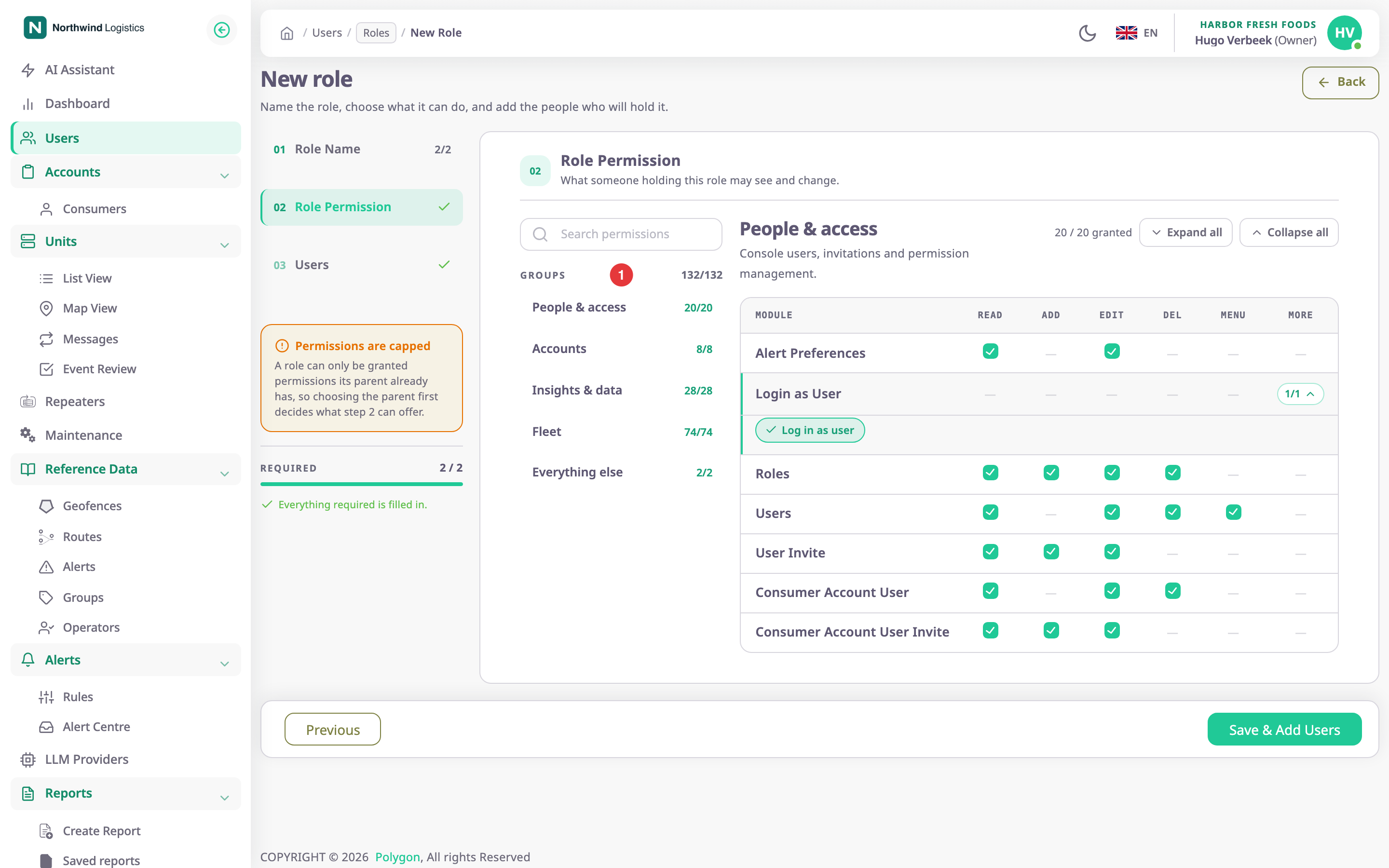
Step 2 of the role wizard sorts permissions into four groups:
| Group | What it covers |
|---|---|
| People & access | Users, invitations, roles, alert preferences and Login as User |
| Accounts | Consumer accounts, and for dealers also dealer accounts |
| Insights & data | Dashboards, reports, the AI Assistant, and for dealers also import, export and migration |
| Fleet | Units, devices, alerts, geofences, routes, groups, operators, maintenance, configurators and, for dealers, SIM cards |
Each module, such as Units or Geofences, is one row. The columns are the common actions:
| Column | Lets the user |
|---|---|
| Read | Open the module's screens and see its records. |
| Add | Create records. |
| Edit | Change records. |
| Del | Delete records. |
| Menu | See the module's entry in the side menu. |
| More | Extra actions for that module only, such as Show Trips on units. |
A dash means the module has no such action. The full list is in the Permissions reference.
¶ Seeing a screen versus seeing it in the menu
Menu and Read are separate. Menu puts the entry in the side menu. Read lets the user open the screen behind it. Give both, or the user either cannot find the screen or finds an entry that does not open.
¶ Sub-account permissions
Some modules have a More action whose name ends in Sub Account, such as Geofence Sub Account. It adds an account picker to that module's list, so the user can also see the records of the accounts below theirs.
¶ Permissions only dealer accounts have
Dealer accounts see more rows than consumer accounts. The extra rows cover dealer accounts and their users, adding and editing devices, SIM cards, import and export, and migration. A consumer account's roles can never hold them.
¶ A user's role is per account
A user who belongs to two accounts holds a separate role in each. Changing their role in one account does not change the other.