The incident view shows everything about one incident: what fired, where, the values at that moment, and who the app notified. It opens when you select an incident in the Alert Centre, the bell at the top of the screen, or a unit's events.
¶ Panel and full page
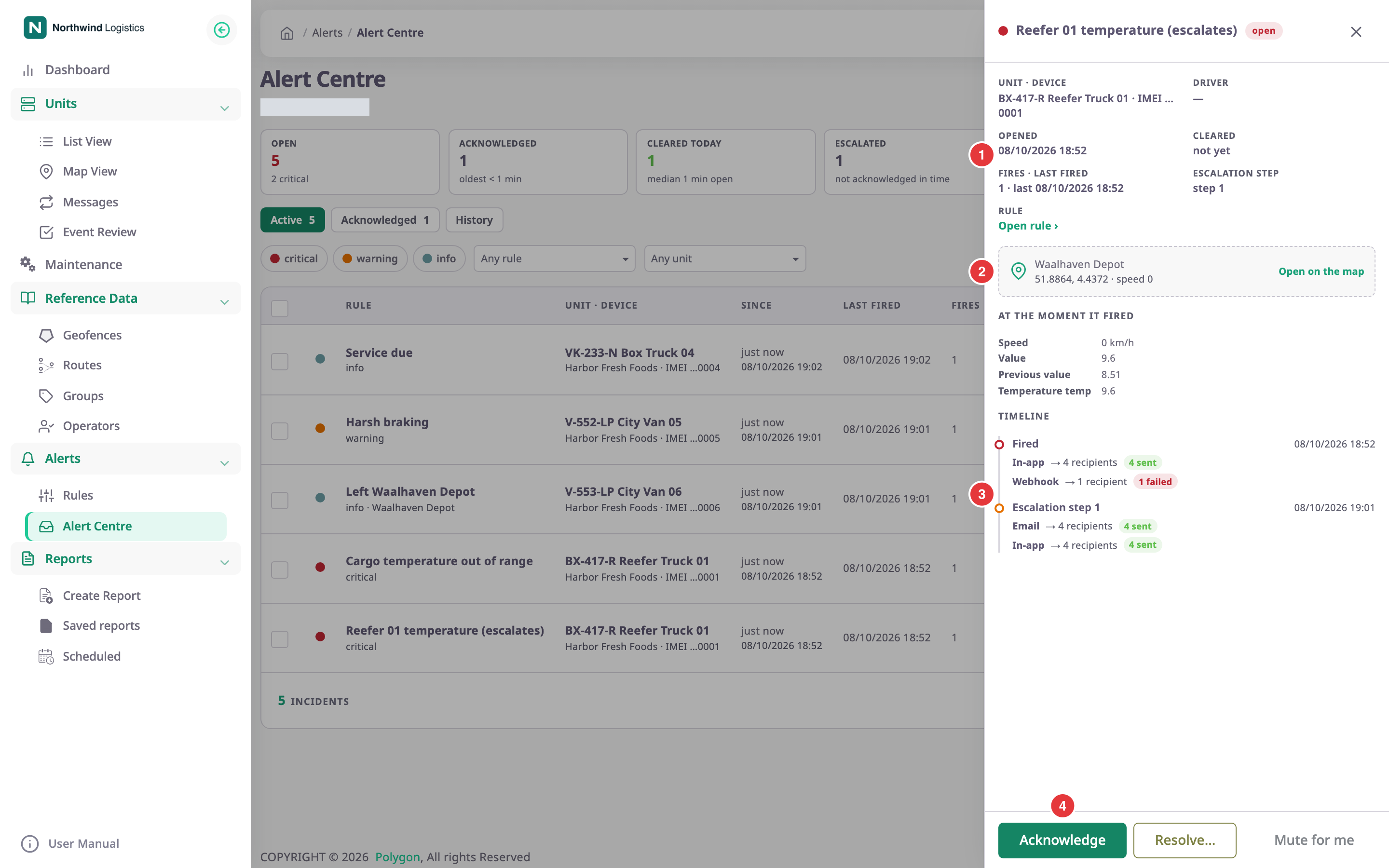
On a wide screen, selecting a row in the Alert Centre opens the incident in a panel on the right. The list stays behind it. Select ✕ or the darkened list to close the panel.
On a narrow screen, and from the bell or a unit's events, the incident opens as a page of its own. Back returns to the Alert Centre. The page and the panel show the same content.
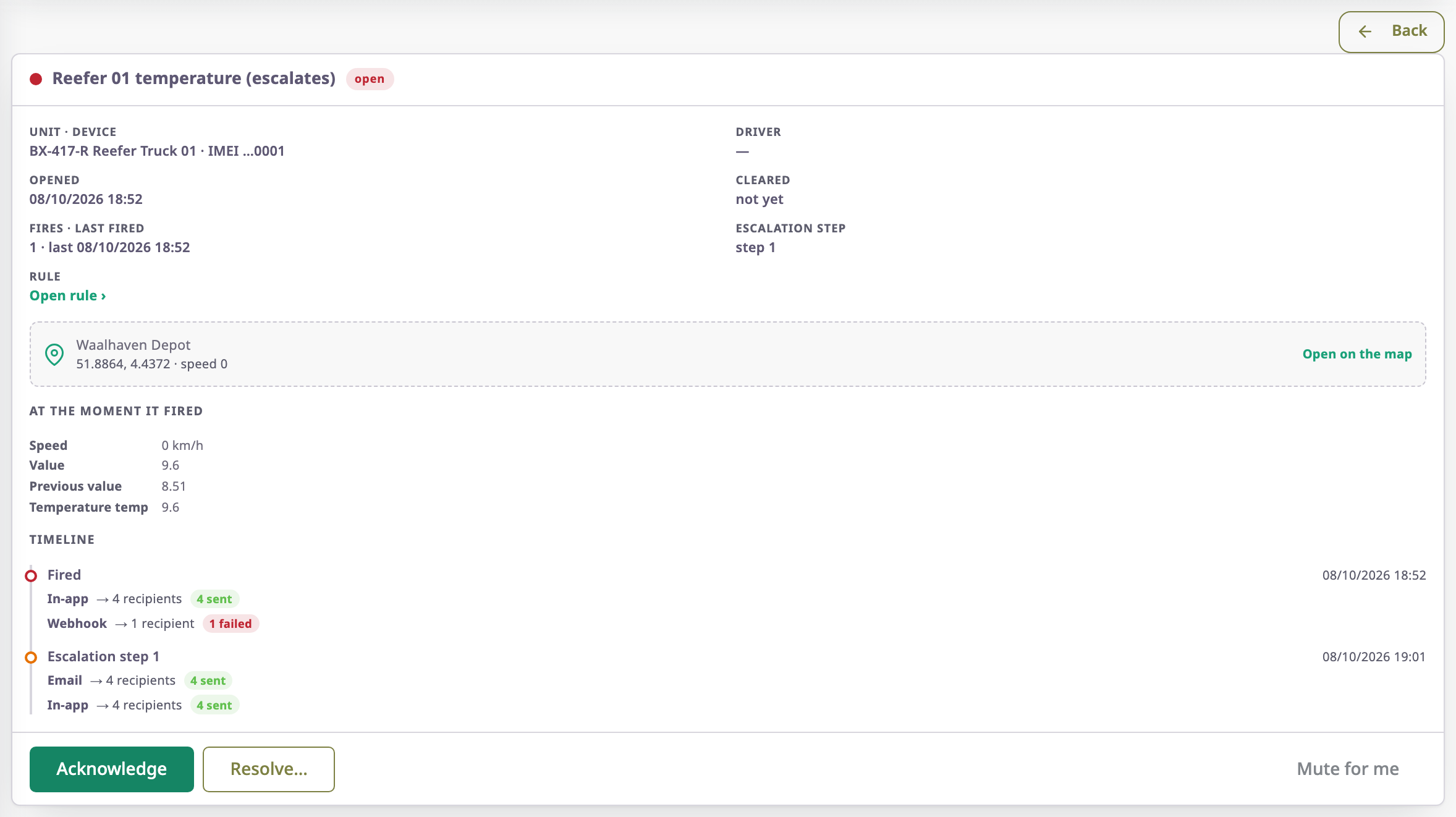
The top line shows the severity dot, the rule name and the status.
¶ Facts
The facts, marked 1:
| Fact | What it shows |
|---|---|
| Unit · device | The unit and the device that reported, or the last digits of its IMEI. |
| Driver | The driver assigned to the unit at the time, or a dash. |
| Opened | When the incident opened. |
| Cleared | When it cleared or someone resolved it, or "not yet". |
| Fires · last fired | How many times the rule fired for this incident, and when last. |
| Escalation step | "none", the step reached, or the next step and when it is due. |
| Sensor, Volume | For sensor and fuel templates: the sensor that matched, and the fuel volume. |
| Account | The account the unit belongs to. |
| Rule | Open rule › opens the rule in the form. |
Below the facts, marked 2, the location card shows the address and the coordinates and speed. "Address not resolved yet" means the app has not looked the address up. Open on the map opens the unit on the tracking screen. It shows the unit's history from 10 minutes before the incident to 10 minutes after it ended. If your role cannot see history, it shows the live view.
¶ Fuel confidence
Fuel theft and refill incidents also show the fuel detector's confidence, for example "High confidence · 86%", and the detection stage:
- "Suspected — verify before acting": the detector has seen a possible theft or refill but has not confirmed it yet.
- "Confirmed": the detector confirmed it.
- "Retracted": more data showed it did not happen. The app withdraws the incident.
"Why this confidence" lists what raised or lowered the score, for example "The vehicle was stationary with the ignition off".
¶ At the moment it fired
This list shows the values the rule saw when it fired, such as speed, the measured value and the previous value. Which values show depends on the template.
¶ Timeline and deliveries
The timeline, marked 3, lists what happened to the incident, oldest first, each with its time:
| Entry | Meaning |
|---|---|
| Fired | The incident opened. |
| Renotified | The rule fired again while the condition stayed true. |
| Escalation step n | Nobody acknowledged in time, so the app ran that escalation step. |
| Acknowledged | Someone acknowledged it. A comment shows in quotes. |
| Resolved | Someone closed it by hand. A comment shows in quotes. |
| Cleared | The condition stopped being true. |
| Suppressed | The rule fired but sent nothing, for example during quiet hours. |
| Retracted | Late data proved it did not happen. |
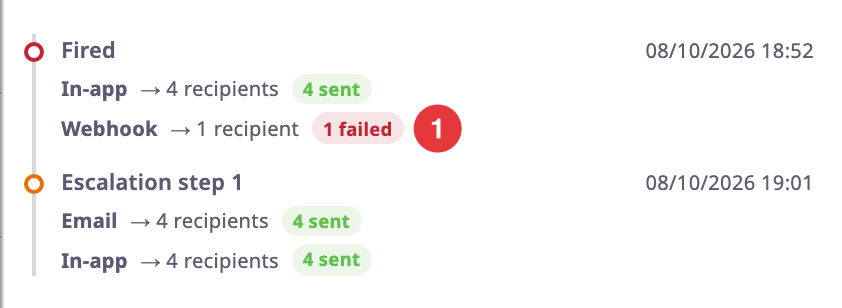
Under each entry, one line per channel shows who the app notified and what happened:
| State | Meaning |
|---|---|
| sent | Delivered. |
| pending | Waiting to go out, or waiting for another attempt. |
| failed | Failed in a way another attempt cannot fix, such as a webhook address the app may not call. Point at the label to see the reason. |
| dead | Failed after every attempt. A webhook delivery in this state has a Retry button. |
| suppressed | Not sent, with the reason in brackets, for example "channel off in preferences" or "quiet hours". |
A command delivery goes further, because the device answers later. "n awaiting device" means the command went out and the device has not answered yet. Once it answers, the line reads "Device: status", for example "Device: Accepted" or "Device: No reply". The statuses are Accepted, Sent, not confirmed, Rejected, No reply, Expired and Failed. A failed one adds the reason in brackets, for example "The device rejected the command".
Retry queues the webhook call again. The message "Queued for another attempt" confirms it.
¶ Actions
The buttons at the bottom, marked 4:
| Action | What happens |
|---|---|
| Acknowledge | For an open incident. Marks it as yours and stops pending escalation steps. |
| Resolve… | Opens Resolve incident, where you can enter a Comment and close the incident now. |
| Mute for me | Stops this rule's notifications to you. The message says its incidents still show. |
See Acknowledge and resolve incidents.
¶ Permissions
- To see incidents you need Alert Incidents with Read.
- Acknowledge, Resolve… and Retry need Alert Incidents with Edit.
- Mute for me needs Alert Preferences with Edit.
- Open rule › opens the form, where you can change the rule only with Alert Rules with Edit.