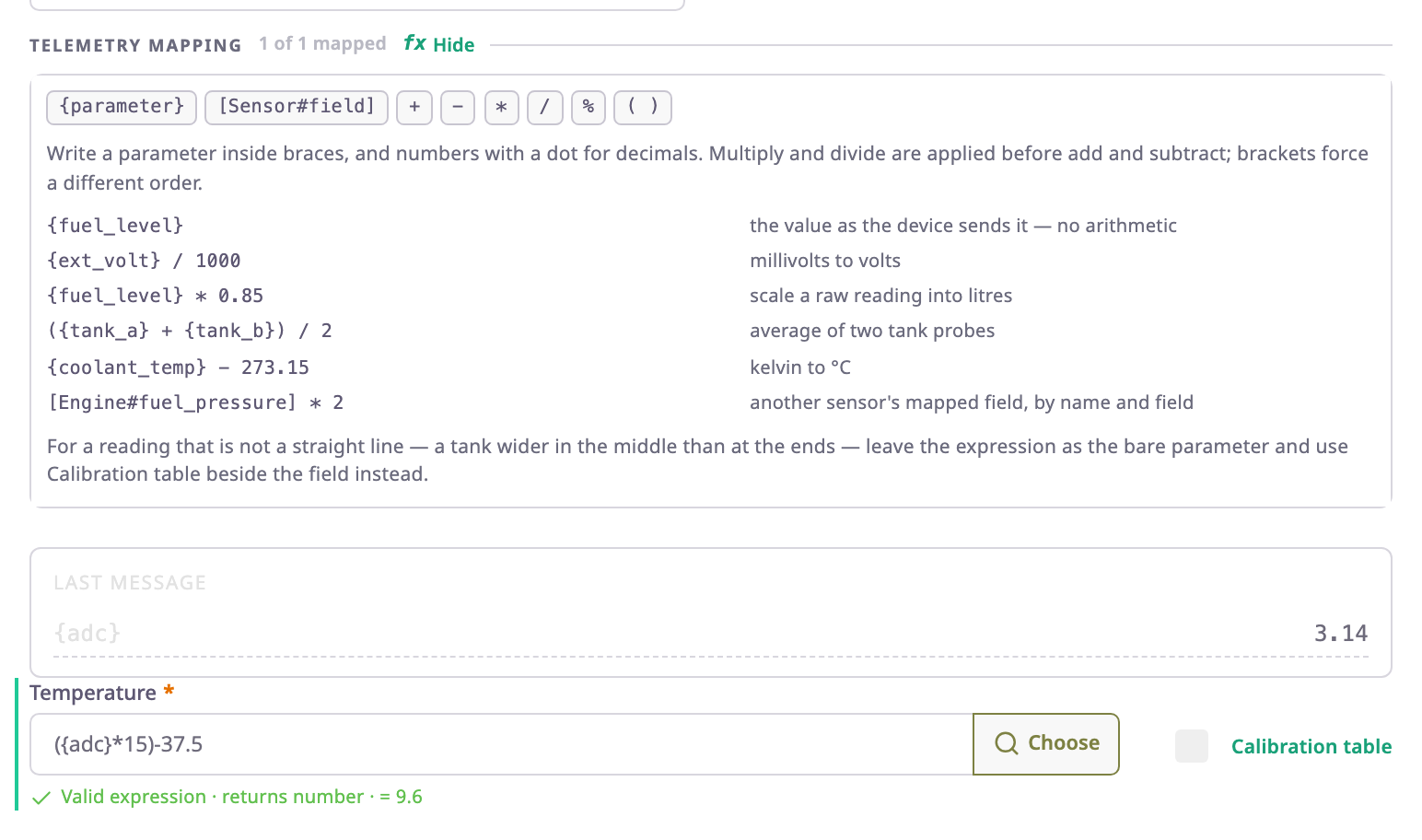
A sensor expression is a short formula in a sensor field. It tells the app how to turn the raw values a device sends into the value the sensor shows. The simplest expression is one protocol parameter in braces, such as {in4}. A longer one scales, combines or tests values: ({adc}*15)-37.5 turns an analogue reading into °C.
¶ When to use one
- The device sends the value you want. Use the bare parameter:
{ext_volt}. - The value needs a fixed factor or offset. Use arithmetic:
{ext_volt} / 1000for millivolts to volts,{coolant_temp} - 273.15for kelvin to °C. - The value combines several readings. Use arithmetic over several parameters:
({tank_a} + {tank_b}) / 2. - The value depends on another sensor. Reference it:
[Ignition#v]==1 ? 1 : 0. - The value depends on a test. Use a condition. See Sensor conditions.
- The relation is not a straight line, such as a tank that is wider in the middle. Keep the bare parameter and add a calibration table. See Calibration tables.
¶ Where you write expressions
You write expressions in the Telemetry mapping group of the sensor dialog. Each row there is one field of the sensor, for example the level of a fuel sensor or the state of an ignition sensor. The group heading counts the fields that have an expression.
To open the dialog, open a device, select the Sensors tab and select Edit on a sensor row. How to write an expression above the fields opens a short guide with the operators and examples. Choose beside a field lists the device's protocol parameters and inserts the one you pick at the cursor.
Settings such as a unit or a tank capacity sit in the Settings group above. They are plain values, not expressions.
¶ Expressions, conditions and calibration tables
Each mapped field can carry three things, which the app applies in this order on every message:
- The expression, which reads parameters and other sensors.
- A condition, which is an expression that chooses between values with
? :. You write it in the expression or with the condition builder on the Conditional tab. - A calibration table, which converts the result of the expression into the final unit. Its lower and upper bounds discard values outside the range you set, either before or after the conversion.
A field that already has a calibration table cannot take a condition until you clear the table. Someone measured the table's points against the old value.
¶ Hints while you type
The line under each field checks the expression as you type and says what is wrong:
- An open bracket, or a sensor name that does not exist.
- A parameter that is neither in the device's protocol nor in its last message, with the closest match. A numbered key such as
{input_status_3}counts when the protocol lists its family, for exampleinput_status_X. - A result that is true or false instead of a number, with the fix: add
? 1 : 0. - When the expression is valid, "Valid expression · returns number", followed by the value the device's last message gives.

The Last message panel above the fields lists the parameters your expressions read, with their values from the device's most recent message. Save stays off while any mapped field is not valid.
¶ What happens on every message
The app computes every field again for each message the device sends. A sensor shows the result on the unit card, and alerts and reports use it.
If a parameter the expression needs is missing from a message, the field usually has no value for that message. The unit card and reports then show nothing for that field. The exact rules are in the Expression reference.
¶ Next steps
- Expression reference: syntax, operators, save errors and worked examples.
- Add a sensor
- Sensor conditions