Every link made for a unit stays in its list until someone deletes it, also after it has ended. Open the list to copy a link again, to check what the recipient sees, or to stop sharing a unit's location.
¶ Before you start
- You need Read on Units. Listing, copying and deleting links need nothing more.
- The list belongs to one unit. Links made by colleagues for the same unit show up too, and you can delete them.
¶ Open the link list
- In the side menu, select Units > Tracking.
- In the unit list, point at the row of the unit and select More.
The unit menu opens. - Under Actions, choose Share live location.
The Share live location view opens. From the unit card, select Share instead.
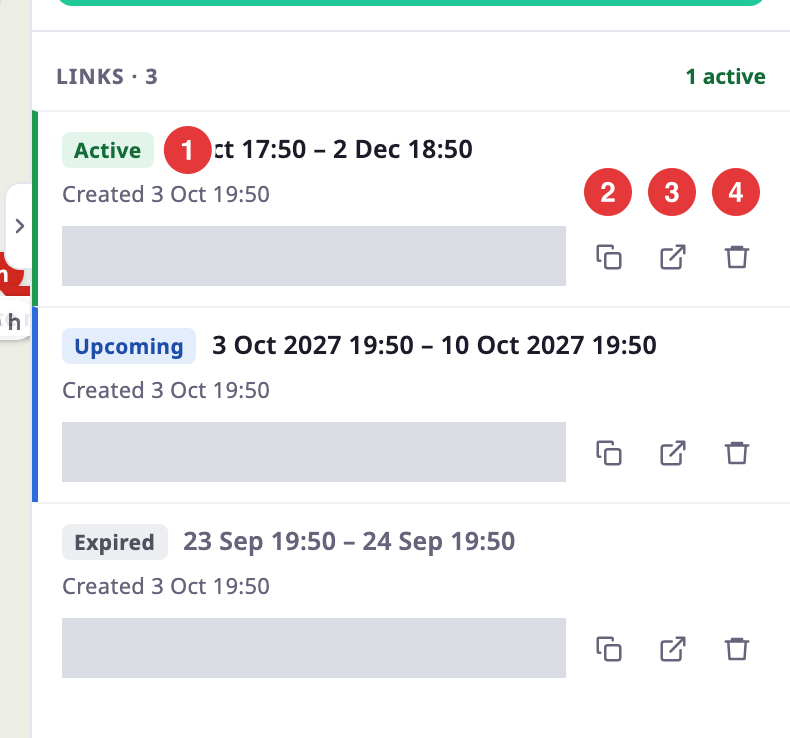
The heading above the list counts the links and how many are active. Each link shows:
- A badge, marked 1: Active while the link works, Upcoming before its start, Expired after its end.
- The period the link covers, in your account's time zone, and when someone created it.
- The link address, and three buttons: copy, marked 2, open, marked 3, and delete, marked 4.
Active links come first, then upcoming, then expired ones; the newest come first in each group. The badges follow the clock while the view is open. If the unit has no links, the list reads "No shared links yet". If it has more than 50, select Show older links at the end of the list.
¶ Copy a link
- In the row of the link, select the copy button, marked 2.
A message reads "Link copied". - Paste the link into your message.
If the browser blocks copying, a message reads "Could not copy. Select the address and copy it." Select the address field; the field selects the whole address, ready to copy.
To check what the recipient sees, select the open button, marked 3. The link opens in a new tab.
¶ Delete a link
- In the row of the link, select the delete button, marked 4.
The row asks "Delete this link? Anyone who has it loses access at once." - Select Delete, marked 2.
A message reads "Link deleted", and the row disappears from the list.
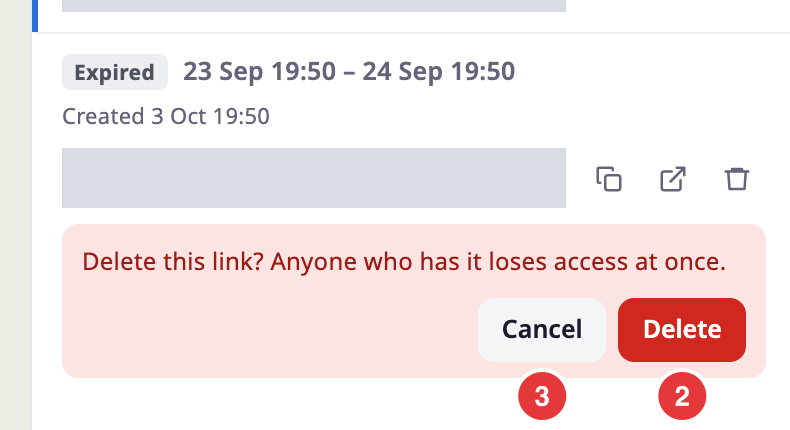
To keep the link, select Cancel, marked 3.
If the server refuses, a message says why, and the view hides Create link and the delete buttons.
¶ What happens next
Deleting a link stops the live updates on the recipient's page within about 10 seconds. Anyone who opens the link afterwards sees that it is not valid. You cannot bring a deleted link back. Create a new link instead. See Share a unit's live location.
A link that has reached its end time shows the "expired" message to recipients. It stays in your list until you delete it.