Two kinds of column go beyond what a source offers. A calculated column works out a value from other columns, such as average speed from distance and time. A conditional column, also called best available, reads each unit from the first source on a list that the unit can answer. For example, it takes the odometer where there is one and GPS otherwise.
¶ Before you start
- Open the template in the builder and select Edit on the table. See Report template builder.
- You need the Add template or Update template action of Reports, and the permission for every source the column reads.
- Check whether the table folds rows together. That changes what a calculation may contain. See Group, filter and total report rows.
¶ Add a calculated column
-
On the table, select Add column.
-
At the bottom of the menu, select Calculated column.
The Calculated column dialog opens. To change an existing one, select ƒ on its chip instead.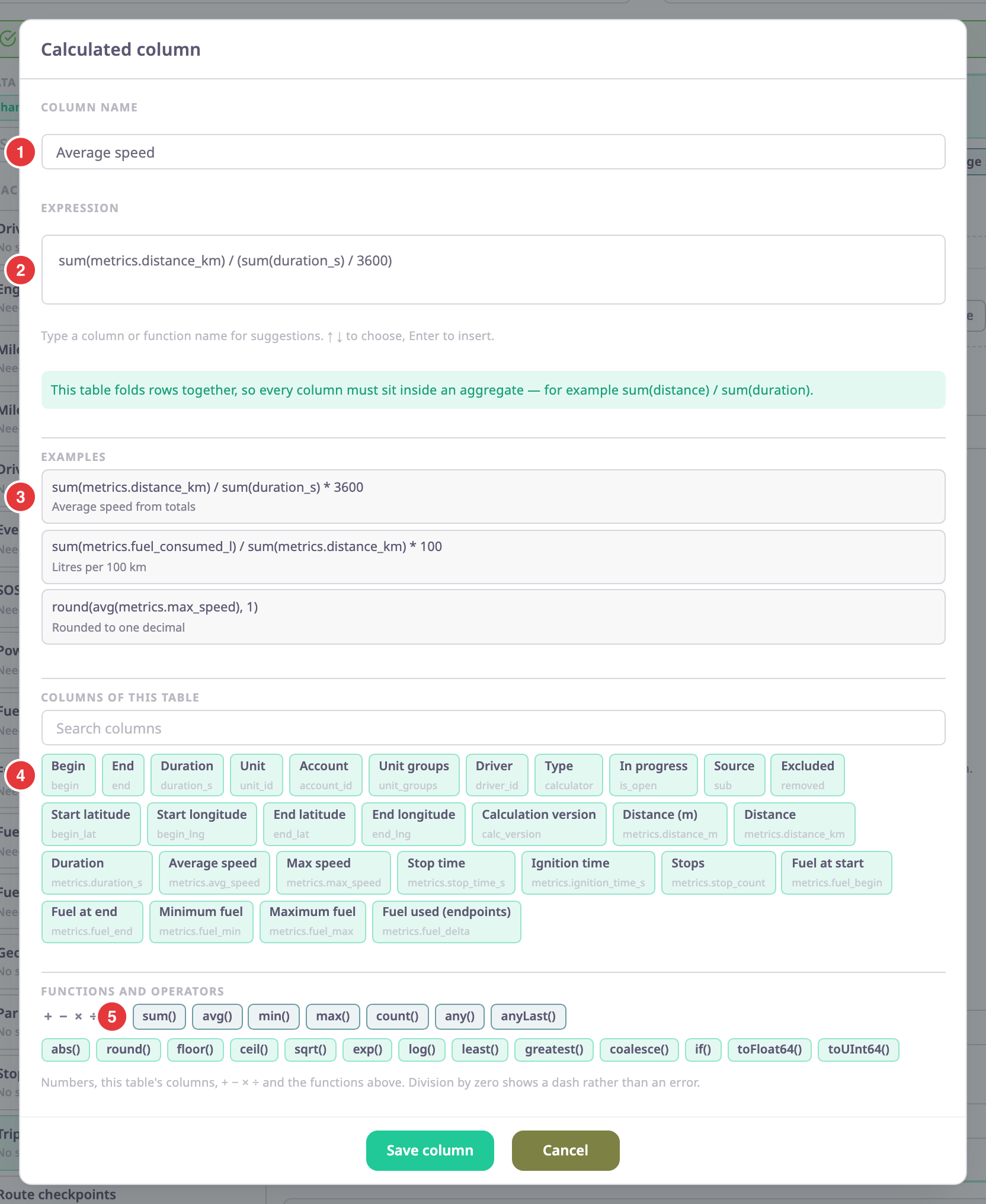
-
In Column name, marked 1, enter the header, for example Average speed.
-
In Expression, marked 2, enter the calculation. You can:
- select an example, marked 3, to copy it into the field;
- select a column of the table, marked 4, to insert its key;
- select a function, marked 5, to insert it.
-
Select Add column, or Save column when you edit.
The column appears on the table with ƒ on its chip.
As you type, suggestions appear. Use the up and down arrows to choose one and Enter to insert it. The button stays disabled while the expression has an error. The message under the field says what is wrong, for example "The brackets do not match."
¶ Expression rules and functions
- Use numbers, the table's columns (by key, such as
metrics.distance_km),+ - * /and brackets. - In a table with one row per record, use columns directly, for example
duration_s / 3600for hours. - In a grouped table, every column must sit inside an aggregate, for example
sum(metrics.distance_km) / sum(duration_s) * 3600. The aggregates aresum,avg,min,max,count,anyandanyLast. - Other functions:
abs,round,floor,ceil,sqrt,exp,log,least,greatest,coalesce,if,toFloat64andtoUInt64. For exampleround(avg(metrics.max_speed), 1). - Dividing by zero shows a dash, not an error.
The examples in the dialog follow the table: litres per 100 km, for example, is sum(metrics.fuel_consumed_l) / sum(metrics.distance_km) * 100.
¶ Add a best-available (conditional) column
For distance and engine hours, ready-made best-available columns are at the top of the Add column menu, under Best available. To build your own:
-
On the table, select Add column.
-
At the bottom of the menu, select Conditional column.
The Conditional column dialog opens. To change an existing one, select ⋔ on its chip instead.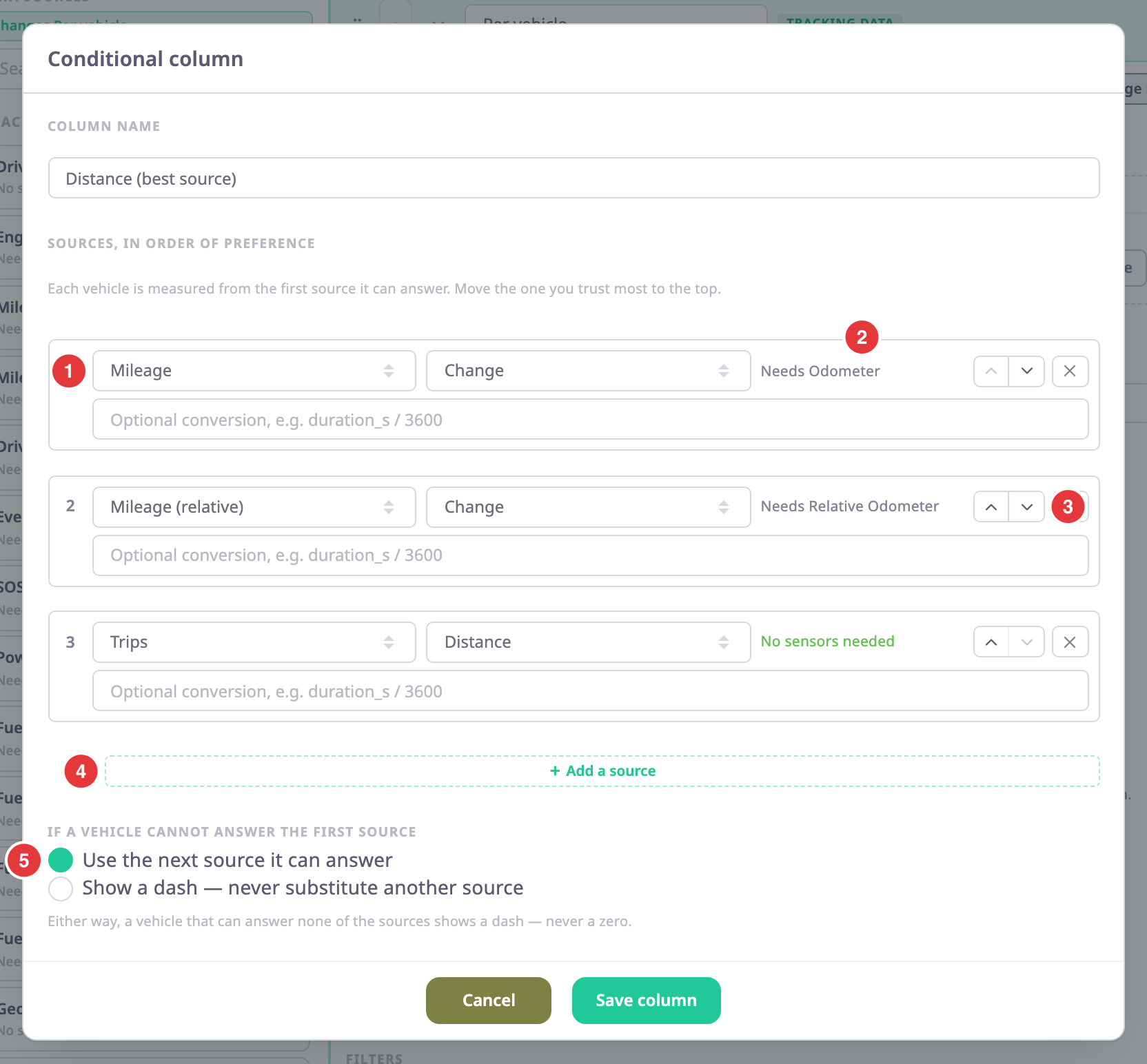
-
In Column name, enter the header, for example Distance (best source).
-
For the first source, marked 1, choose the source and its column. The tag next to it, marked 2, says what sensor a unit needs.
-
Select Add a source, marked 4, and choose the next source and column. Repeat for each fallback. You need at least two.
-
Optional: In a source's conversion field, enter an expression that brings its value into the same unit, for example
duration_s / 3600. -
Under "If a vehicle cannot answer the first source", marked 5, choose:
- Use the next source it can answer: the report reads each unit from the first source it can answer.
- Show a dash — never substitute another source: a unit without the first source shows a dash.
-
Select Add column, or Save column when you edit.
The column appears with ⋔ on its chip.
Either way, a unit that can answer none of the sources shows a dash, never a zero.
¶ Order the fallback sources
The report reads each unit from the first source on the list that it can answer. Put the source you trust most at the top. Use the up and down arrows, marked 3, to move a source, and × to remove it.
In a table with one row per record, a conditional column can read only sources the table already has. The dialog says so and offers Add them to the table.
In the report, the header of a conditional column has an info icon. Select it to see which source each unit came from. See Where report data comes from.