Record a recharge each time you top up a SIM. The app uses the latest due date to show Due Date in the list and to decide which SIMs are overdue.
¶ Before you start
- You need SIMS > Recharge Manage. The built-in Owner role of a dealer account has it. Without it, the list hides the recharge icon and button.
- Have the plan name, the amount and the number of days the recharge lasts.
¶ Recharge one SIM
- In the side menu, select Reference Data > SIM Management.
The SIM list opens. - Select the Recharge icon on the SIM's row.
The Recharge dialog opens. - In Plans, enter the plan, for example M2M 500 MB.
- In Amount, enter the cost, for example 7.5.
- In Recharge validity (In days), enter the days, for example 30.
- In Select Recharge Date, check the day. It starts at today.
- Select Save.
The app shows "Recharge Added Successfully". Recharge and Due Date in the list show the new recharge.
For every field, see Recharge dialog. You can also open the dialog from the Recharge button on the SIM details.
¶ Recharge several SIMs
- In the SIM list, tick the SIMs.
The batch bar appears. - Select Recharge in the batch bar.
The Recharge dialog opens and says how many SIMs it applies to. - Fill in the fields as above.
- Select Save.
The app asks "Add this recharge to 3 selected items?" - Select Yes.
The Result dialog says how many SIMs got the recharge and lists any that failed. - Select Ok.
The list reloads.
¶ Edit or delete a recharge
Use this when you entered a wrong plan, amount or date.
-
In the SIM list, select the View icon on the SIM's row.
The SIM details open with Recharge History. -
Select the Edit icon on the wrong recharge.
The Recharge dialog opens with its values.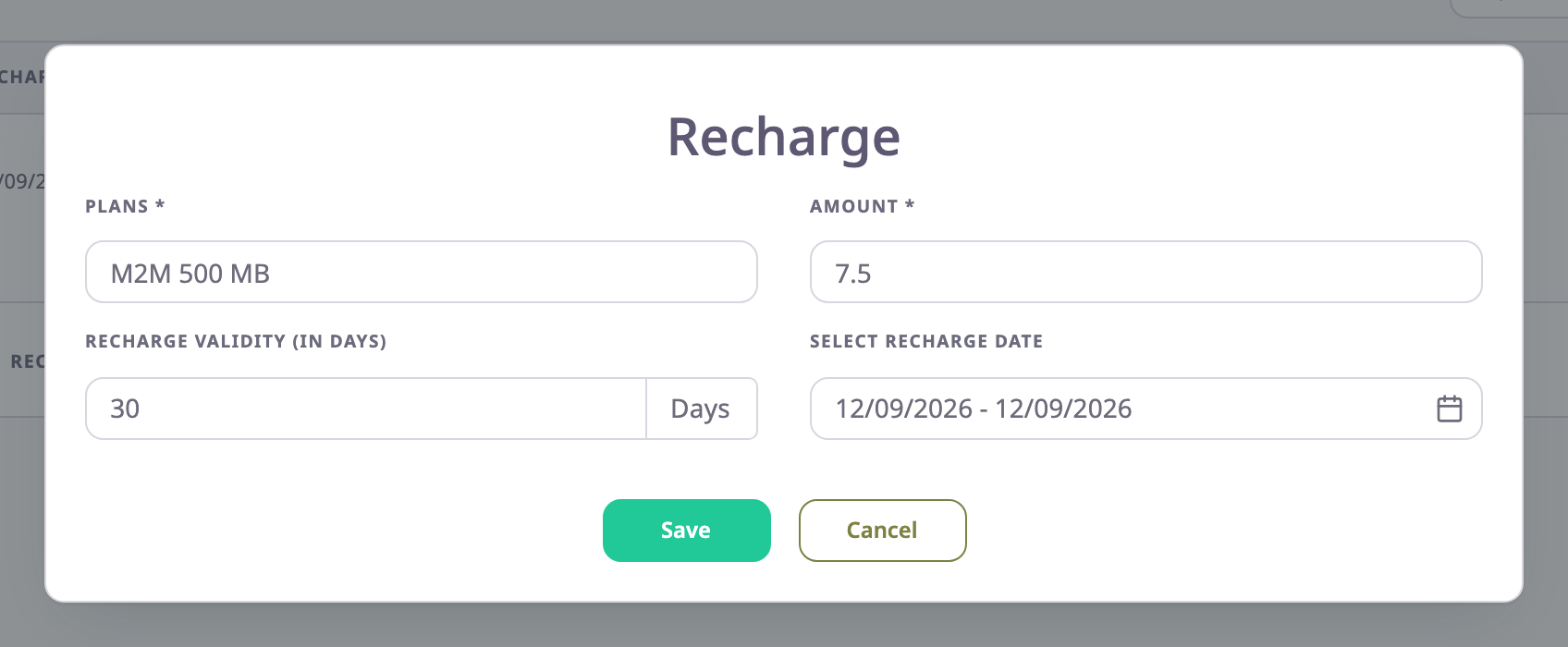
-
Change the values and select Save.
The history shows the corrected recharge. -
To remove a recharge, select the Delete icon on its row and confirm.
The app shows "Recharge deleted successfully".
¶ What happens next
- The due date of a recharge is its date plus its validity. The SIM list shows the recharge with the latest due date.
- When the latest due date passes, an Active SIM counts under Overdue.
- Deleting a recharge removes it from the history. The SIM list can keep showing its plan and due date until another recharge replaces it.