The SIM details screen shows one SIM and every recharge recorded for it. To open it, in the side menu, select Reference Data > SIM Management, then select the View icon on the SIM's row.
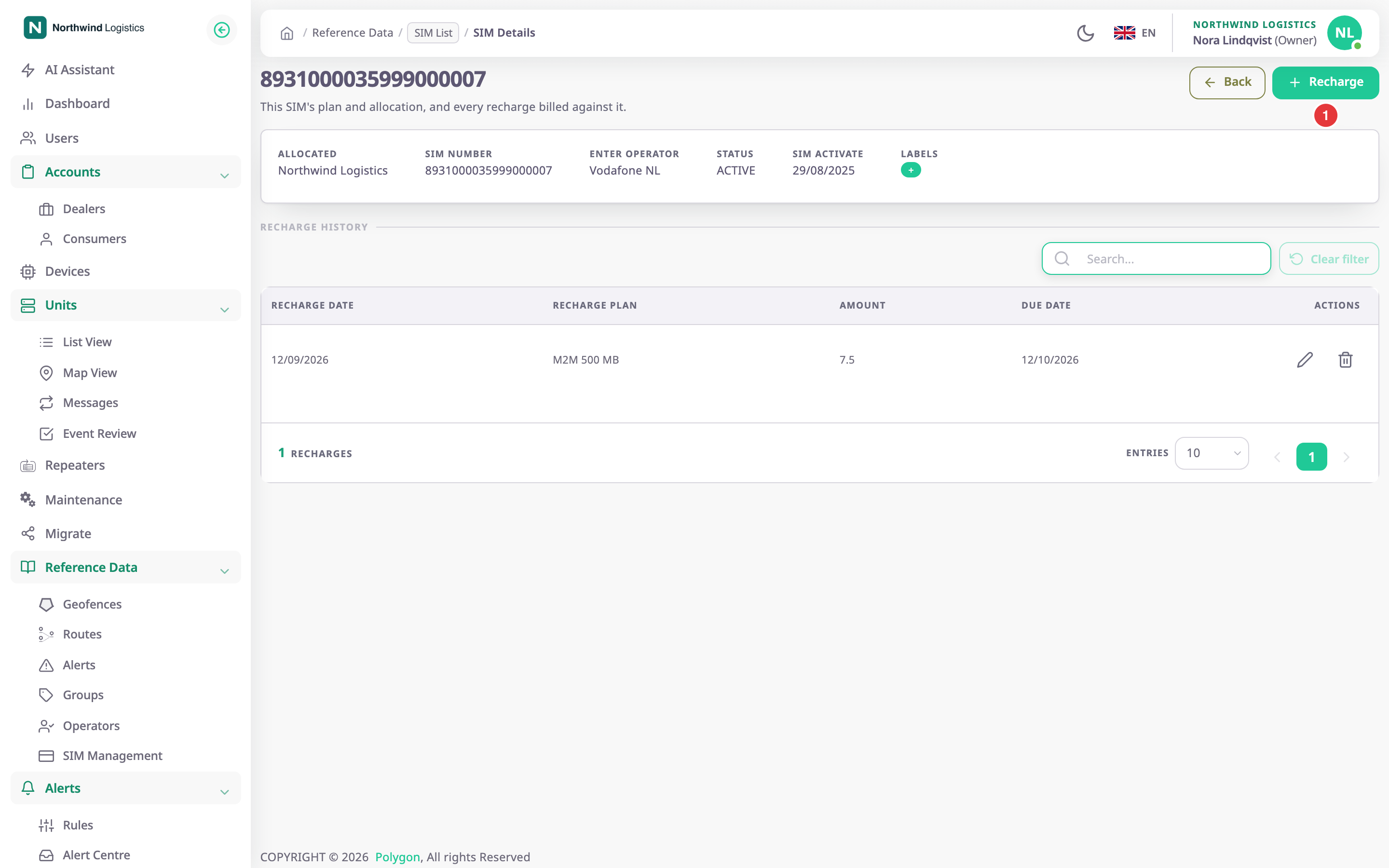
The page title is the SIM number. The lead text reads "This SIM's plan and allocation, and every recharge billed against it."
¶ Summary
The summary card shows these values. They are read-only; to change them, use SIM form.
| Label | Shows |
|---|---|
| Allocated | The account that holds the SIM. |
| SIM Number | The SIM number. |
| MSISDN | The phone number. Shown only when the SIM has one. |
| ICCID | The ICCID registered on the SIM, or "—". |
| Reported by device | The ICCID the fitted device last reported, a status chip and when it was seen, for example "Seen 12/09/2026". See ICCID status. |
| IMSI | The IMSI. Shown only when the SIM has one. |
| Enter operator | The mobile operator. The label is a catalogue slip: it should read Operator. |
| Status | ACTIVE, INACTIVE or SUSPENDED, in capitals. |
| SIM Activate | The activation date, in your account's date format. |
| Labels | The groups on the SIM. |
¶ The ICCID status chip
The chip next to the reported ICCID compares it with the registered one.
| Chip | Means |
|---|---|
| Matches device | The device reports the registered ICCID. |
| Mismatch | The device reports a different ICCID. Check which card is in the device. |
| Not reported | The SIM has an ICCID, but the device has not reported one. |
| Not registered | The device reports an ICCID, but the SIM has none. |
When the SIM has no ICCID and the device has reported one, Use reported ICCID saves the reported value on the SIM. The app shows "ICCID saved from the device report". The button needs SIMS > Edit.
¶ Recharge history
Recharge History lists the recharges of this SIM, newest due date first. A recharge you delete does not show.
| Column | Shows |
|---|---|
| Recharge Date | The day the recharge was made. |
| Recharge plan | The plan name. |
| Amount | What it cost. |
| Due Date | The recharge date plus its validity. |
| Actions | Edit and Delete. |
Search... filters the history by amount. Entries and the page numbers at the bottom page through long histories.
¶ Buttons and actions
| Action | What happens |
|---|---|
| Back | Returns to the SIM list. |
| Recharge, marked 1 | Opens the Recharge dialog for this SIM. See Recharge dialog. |
| Edit icon on a recharge | Opens the same dialog filled with that recharge. See Record a SIM recharge. |
| Delete icon on a recharge | Asks you to confirm, then removes the recharge. The app shows "Recharge deleted successfully". The icon shows only with Recharge Manage. |
¶ Permissions
- To open the screen you need SIMS > Read.
- Adding, editing and deleting a recharge needs SIMS > Recharge Manage. The Recharge button and the Edit icon show without it, but the server refuses the save.
- The built-in Owner role of a dealer account has all of them.