Escalation makes sure a critical incident does not sit unseen. If nobody acknowledges it within the time you set, the app notifies more people, for example the fleet manager after 15 minutes.
¶ Before you start
- You need Alert Rules with Add for a new rule, or Edit to change one. The Owner role has both.
- Know whom to escalate to: a role, named users, or everyone in the account.
- Escalation works on the rule's incidents. Create the rule first, or add escalation while you create it. See Create an alert rule.
¶ Add an escalation step
-
In the side menu, select Alerts > Rules.
-
Select the rule's name.
The rule form opens. -
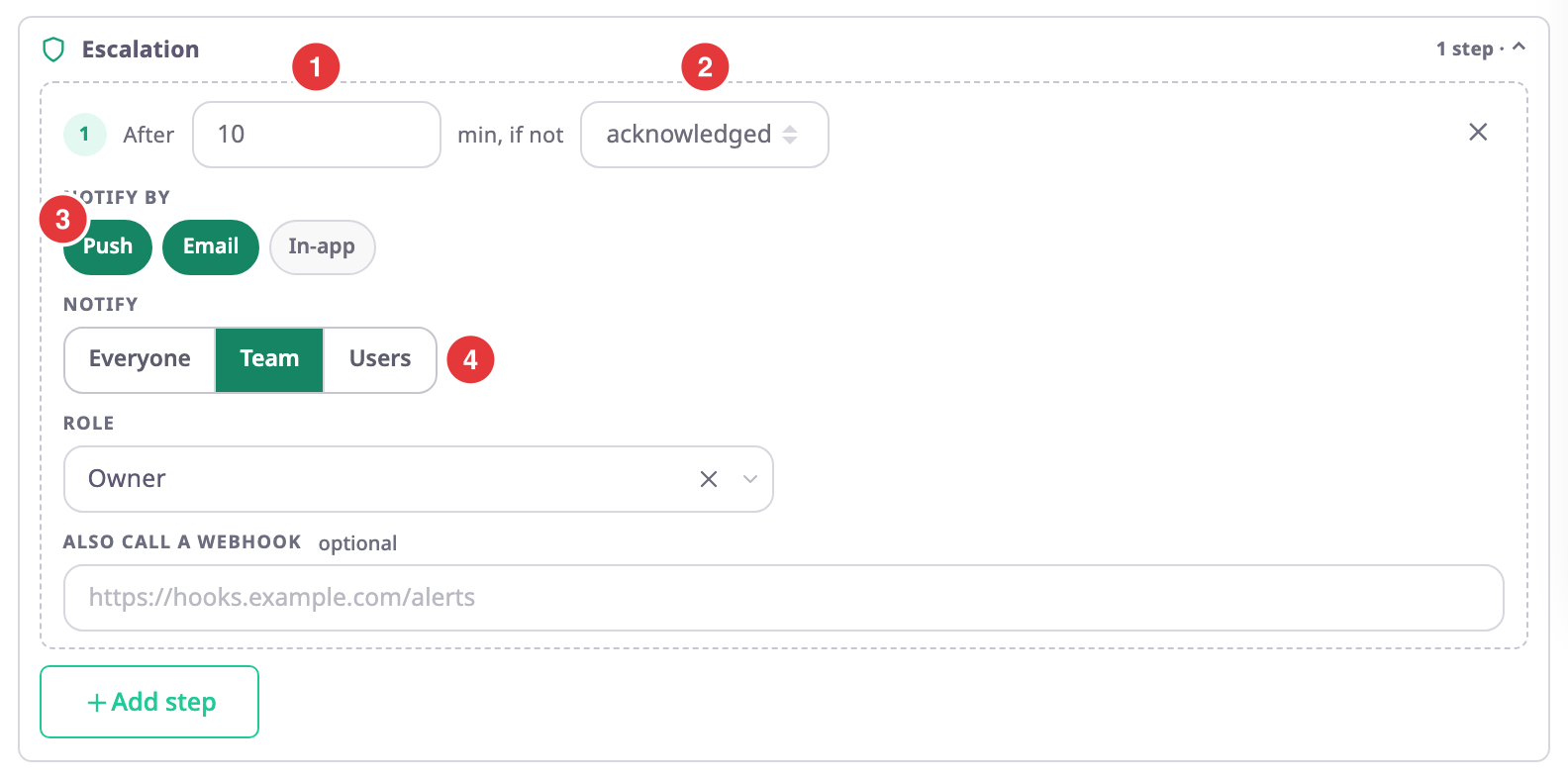
In the Escalation section, select Add step, marked 1.
Step 1 appears, set to 15 minutes.
-
In After, marked 1, enter how many minutes to wait, for example 10.
-
In the list after "min, if not", marked 2, choose acknowledged or resolved.
With acknowledged, the step runs only if nobody acknowledged the incident in time. With resolved, it runs if nobody resolved it. -
In Notify by, marked 3, select the channels: Push, Email or In-app.
-
In Notify, marked 4, choose Team and the Role to escalate to, or Users, or Everyone.
-
Optional: in Also call a webhook, enter an address to call when the step runs.
-
Select Save rule.
The message "“name” saved. It is live within a second." confirms it.
¶ Add more steps
Select Add step again for a further step. A new step starts at twice the time of the step before, for example 30 minutes after a 15-minute step. Each step must come later than the one before it.
To remove a step, select Remove step (✕) at the end of its row.
¶ What happens when someone acknowledges
Acknowledging the incident cancels every step that has not run yet.
While a step is waiting, the incident shows the next step and when it is due under Escalation step. Once a step runs, the timeline shows "Escalation step 1" with its deliveries, and the Escalated counter in the Alert Centre counts the incident.
See Incident details.
¶ If the rule does not save
| Message | What it means | What to do |
|---|---|---|
| "Escalation step 1 notifies nobody" | The step has no channel and no webhook. | Select a channel in Notify by, enter a webhook, or remove the step. |
| "Pick the role to notify" | Notify is Team without a role. | Choose a Role. |
| "Escalation step 2 must wait longer than the step before it" | Each step must run later than the one before. | Raise the step's minutes. |
| "Pick the role escalation step 1 notifies" | The step's Notify is Team without a role. | Choose the step's Role. |
| "Pick at least one user for escalation step 1" | The step's Notify is Users with nobody chosen. | Choose at least one user. |