The Position filter tab decides which positions from the device count as good fixes. It also decides whether the app may estimate a position from cell towers or Wi-Fi when GPS fails. To open it, in the side menu select Devices, select Edit on the device's row, then select the Position filter tab. Every device has this tab.
¶ How position filtering works
For each message, the app tests the position against the checks on this tab. A position fails if it is impossible, such as outside the map or exactly 0,0. It also fails if the device itself marks it invalid, or if it breaks one of the thresholds.
What happens to a failed position depends on how your service provider runs the platform:
- Standard, watch only: the app marks the position as rejected and keeps it. In the device's messages the row shows as rejected and the track leaves it out. The map, trips, mileage and reports still use it. This is the default.
- Strict: the app replaces a failed position with the last good one, as the tab's hint says. Ask your service provider whether your platform runs this way.
The tab applies to new messages only. Saving it does not recalculate past trips or reports.
¶ GPS checks
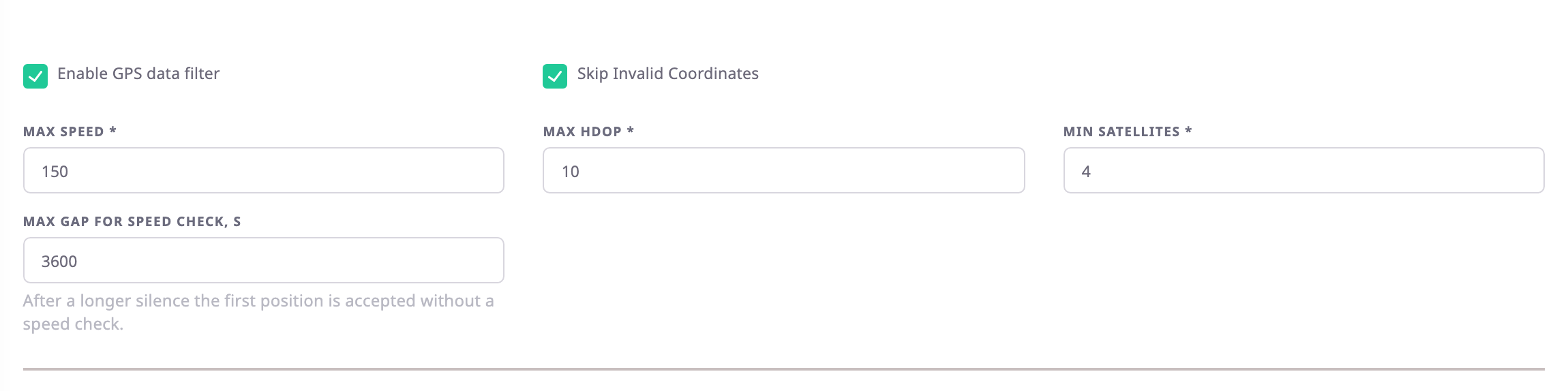
| Field | Required | What it does | Allowed values / example | Notes |
|---|---|---|---|---|
| Enable GPS data filter | No | Turns on the satellite, HDOP and speed checks below. | On or off | Default on. Off still rejects impossible positions and positions the device marks invalid. |
| Skip Invalid Coordinates | No | Rejects positions the device itself marks as invalid. | On or off | Default on. Greyed out while the filter is off. |
| Max Speed | Yes | Rejects a position the unit could only reach from the last good one by going faster than this. | 1 to 9999 km/h, whole number. Example: 150 | Default 150. The app works the speed out from distance and time; it does not use the speed the device reports. |
| Max HDOP | Yes | Rejects positions whose HDOP, the receiver's own accuracy figure, is above this value. | 0.5 to 50, in steps of 0.1. Example: 10 | Default 10. Messages without HDOP pass. |
| Min Satellites | Yes | Rejects positions fixed from fewer satellites. | 1 to 255, whole number. Example: 4 | Default 4. Messages without a satellite count pass. |
| Max gap for speed check, s | No | After a silence longer than this, the app accepts the first position without the speed check. | 60 to 86400 seconds. Example: 3600 | Default 3600. A unit can travel far while a device is off, so the speed tells nothing. |
¶ Cell and Wi-Fi positioning
When GPS is missing or rejected, the app can estimate where the unit is. It uses the cell towers or Wi-Fi access points the device reports. These positions are approximate. The map draws them as a circle. Trips, mileage and geofences ignore them unless you turn on the last two options.
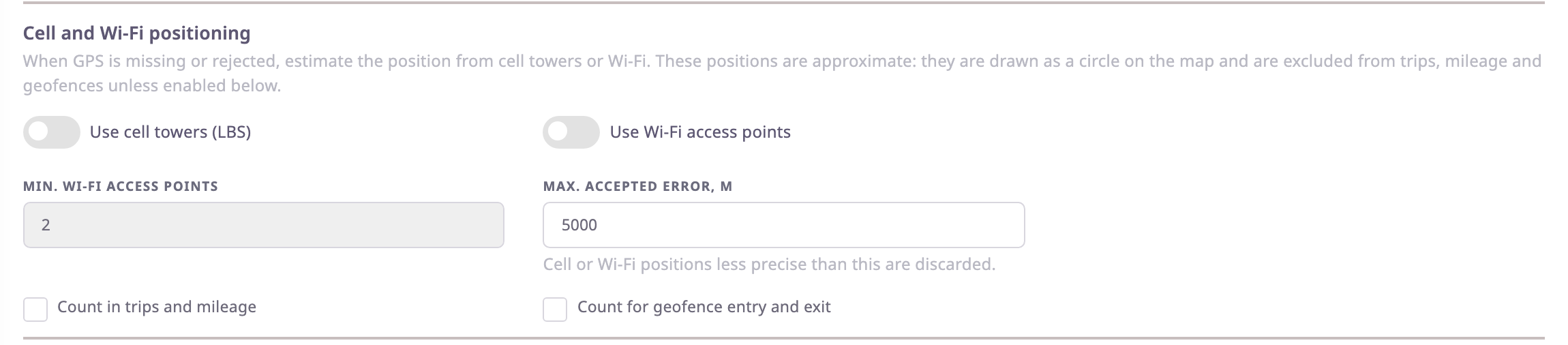
| Field | Required | What it does | Allowed values / example | Notes |
|---|---|---|---|---|
| Use cell towers (LBS) | No | Estimates the position from the cell towers the device reports. | On or off | Default off. |
| Use Wi-Fi access points | No | Estimates the position from the Wi-Fi access points the device reports. | On or off | Default off. |
| Min. Wi-Fi access points | No | The fewest access points a Wi-Fi position may rest on. | 1 to 10. Example: 2 | Default 2. Only while Use Wi-Fi access points is on. |
| Max. accepted error, m | No | Discards cell or Wi-Fi positions less precise than this. | 100 to 50000 metres. Example: 5000 | Default 5000. |
| Count in trips and mileage | No | Lets these positions move the unit in trips and add to mileage. | On or off | Default off. |
| Count for geofence entry and exit | No | Lets these positions trigger geofence entries and exits. | On or off | Default off. |
The switches work only when all of these are true:
- Your service provider has turned on cell positioning for the platform, and Wi-Fi positioning for Use Wi-Fi access points. Both are off on a new installation.
- Your account has not had cell and Wi-Fi positioning switched off. It is on unless someone switches it off, and there is no screen for that.
- For cell towers, the device has a GSM sensor whose cell ID field reads a device parameter.
If the account or the GSM sensor rules it out, the app greys out the section and says why:
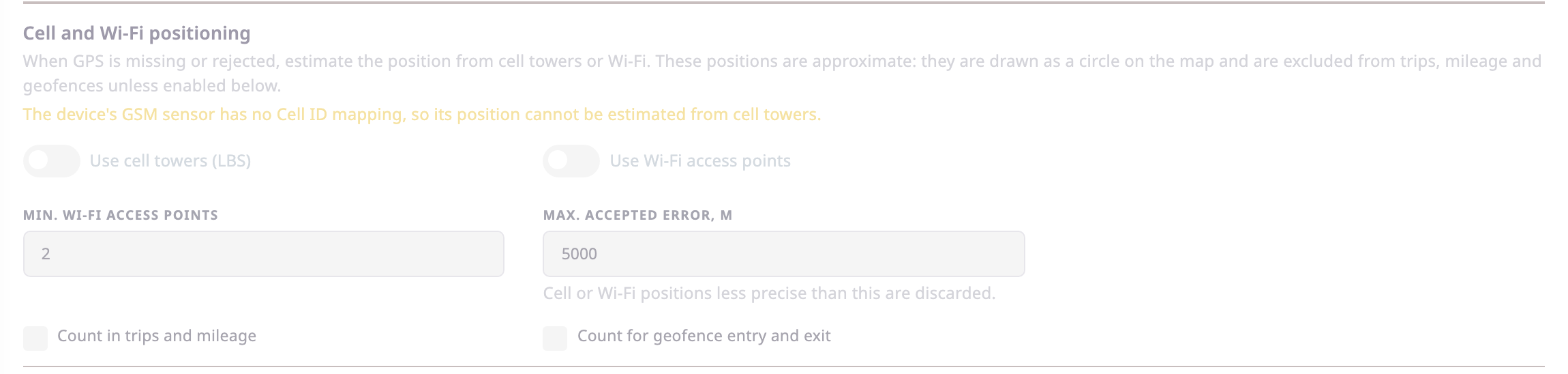
- "Cell and Wi-Fi positioning is switched off for this account."
- "The device's GSM sensor has no Cell ID mapping, so its position cannot be estimated from cell towers."
The account message checks your own account. The device itself follows the setting of the account it reports for.
¶ Raw data filters
Devices set up earlier, or imported, can carry median or Kalman raw-data filters. The tab does not show them, and the app does not apply them.
¶ Saving
Select Save Changes. The message "Device filters configuration saved successfully" appears, and the next message from the device uses the new checks.
If a value is outside its range, the app refuses it with a message such as "Invalid maximum speed" or "Invalid maximum HDOP".
¶ Buttons and actions
| Action | What happens |
|---|---|
| Save Changes | Saves the tab for new messages. Shown only when you opened the device with Edit. Disabled while a value is out of range. |
| Back | Returns to the Devices list without saving. |
¶ Permissions
- To change the tab you need the Edit action of the Devices module, and the device must be one you can edit. Only dealer accounts have it; the built-in Owner role of a dealer account does.
- With View, the tab shows the same settings read-only.