The rides explorer lists the recorded rides of a schedule and judges each against its plan. To open it, in the Routes tab, open a route and select a schedule's name.
¶ Opening the explorer
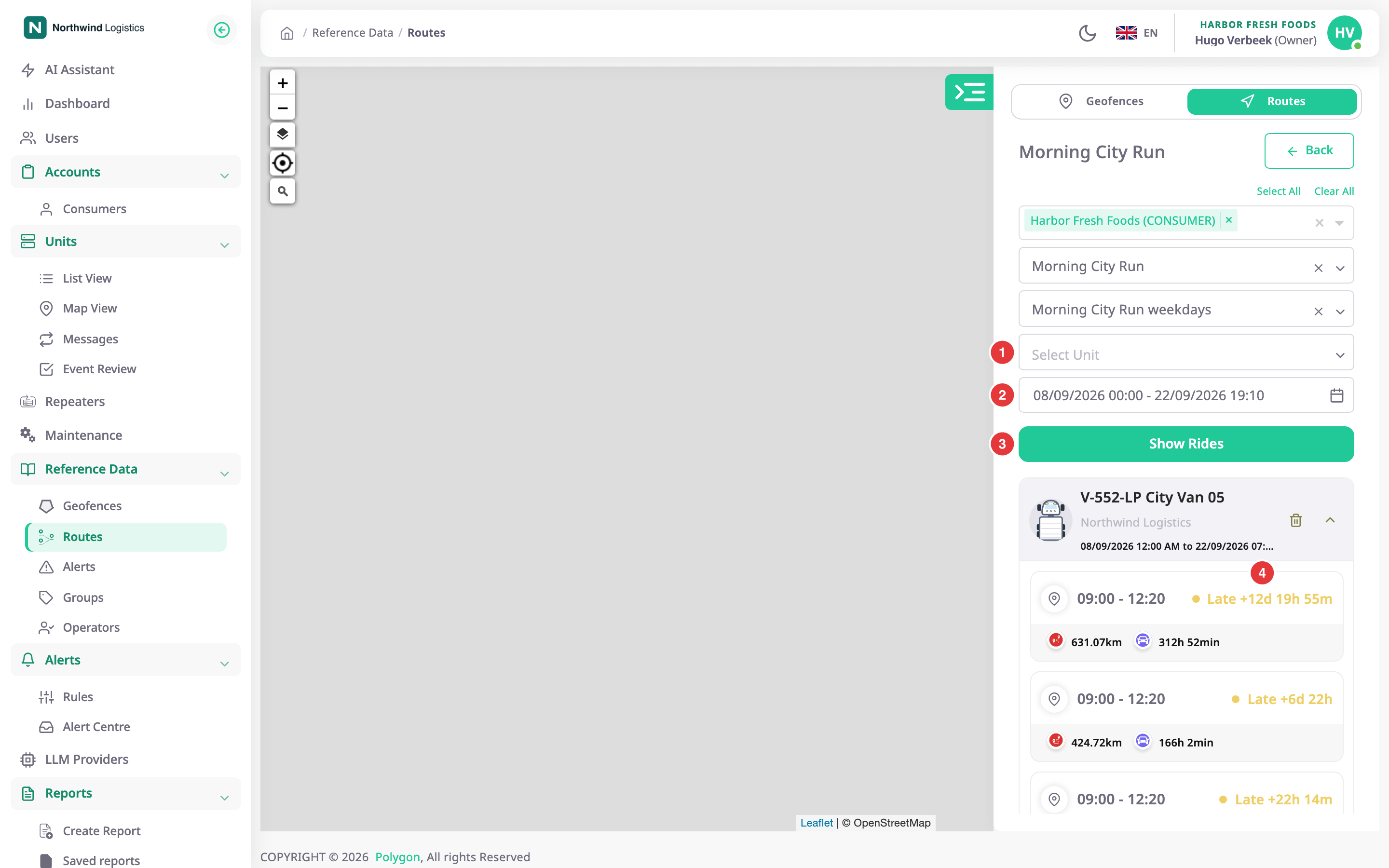
The panel switches from the route list to the explorer, titled with the route's name. Back returns to the list. The filters start filled from the schedule you opened.
¶ Filters
| Filter | What it does |
|---|---|
| Account list, with Select All and Clear All | Chooses which accounts' units to include. |
| Route list | Chooses the route. Changing it reloads the schedules. |
| Schedule list | Chooses the schedule. |
| Select Unit, marked 1 | Limits the rides to one unit. Leave it empty to include every unit assigned to the schedule. |
| Choose Date, marked 2 | Limits the rides to those that started in a date and time range. Leave it empty for no date limit. |
| Show Rides, marked 3 | Loads the rides. |
For a Fixed date schedule the date range is filled from the schedule's window and cannot be changed. The filters of the schedule's When it runs step also apply: a ride that started outside them does not show. See Schedule wizard.
¶ Ride cards
Each Show Rides adds a result card for the unit and the date range. Showing the same filters again refreshes that card. A card has the unit's icon and name, its account and the date range. The trash icon, tooltip Remove, deletes the card from the list only. The arrow opens or closes the rides.
Under it, one ride card per ride:
| Part | What it shows |
|---|---|
| Time window | The ride's start and end. |
| Status, marked 4 | On schedule, Late or Incomplete, with how late a late ride was, such as "Late +6d 22h". |
| Distance | The kilometres the unit drove during the ride. |
| Duration | How long the ride took. |
If nothing matches, the card reads "No rides yet". After you edit a schedule the explorer recalculates its rides: it shows "Recalculating rides for the updated schedule…" and then "These rides were recalculated against the current schedule."
¶ Ride detail
Select a ride card. The unit's track and the checkpoints draw on the map, and a card opens over the map.
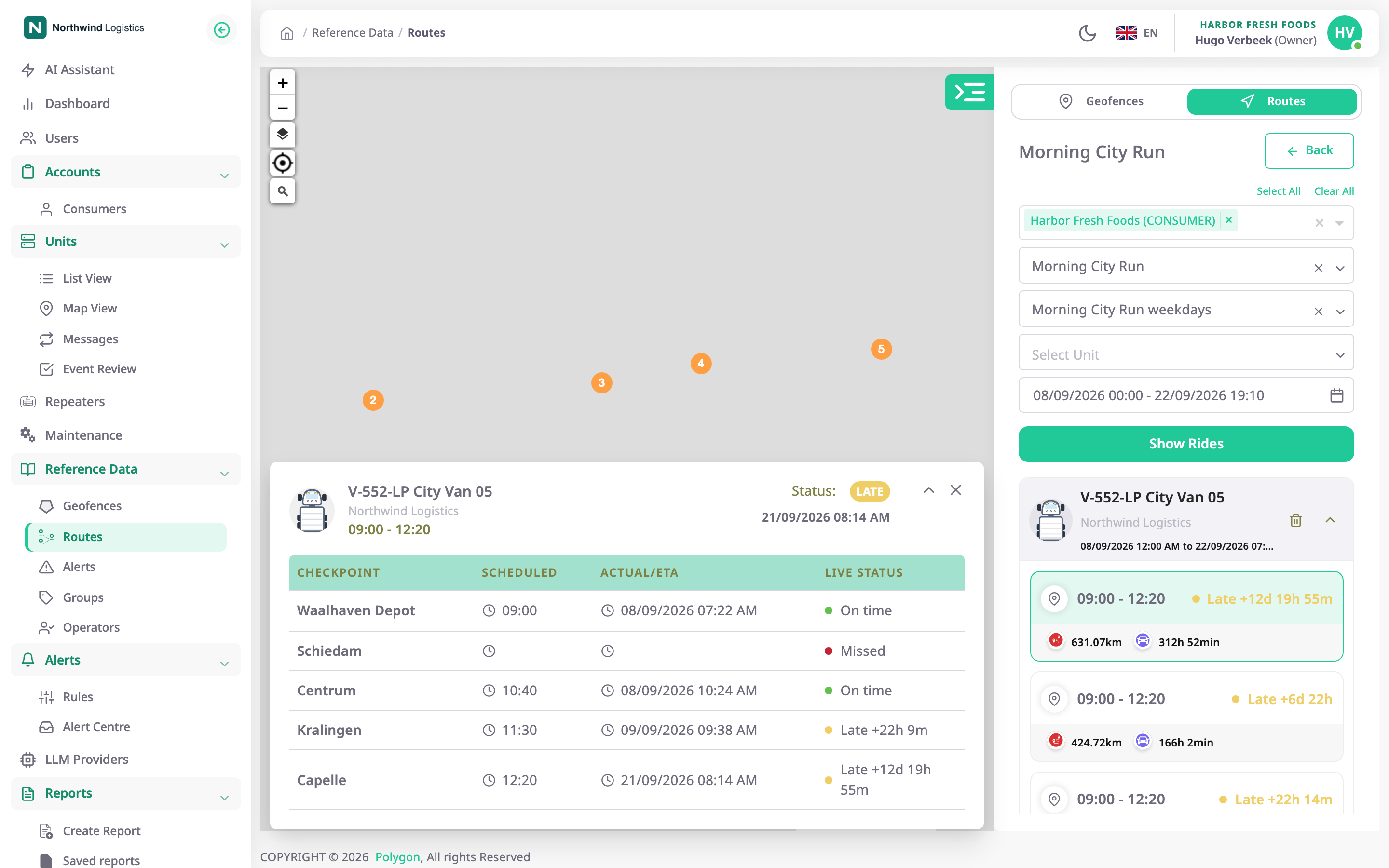
The card shows the unit, its account, the ride's window and its Status. The table has the columns Checkpoint, Scheduled, Actual/ETA and Live Status. The arrow collapses or expands the checkpoints, and the cross closes the card.
¶ Statuses
| Status | Where | Meaning |
|---|---|---|
| On schedule | Ride | Every arrival was within its tolerance. |
| Late | Ride, checkpoint | An arrival was later than arrival time plus tolerance. |
| Incomplete | Ride | The ride ended before its last checkpoint. |
| On time | Checkpoint | The unit arrived within the window. |
| Pending | Checkpoint | The ride is open and the unit has not reached it. |
| Missed | Checkpoint | The ride ended and the unit never entered it. |
See Route schedules and rides for how a ride opens and ends.
¶ Permissions
- To open the explorer you need Routes > Read. The Owner role has it.