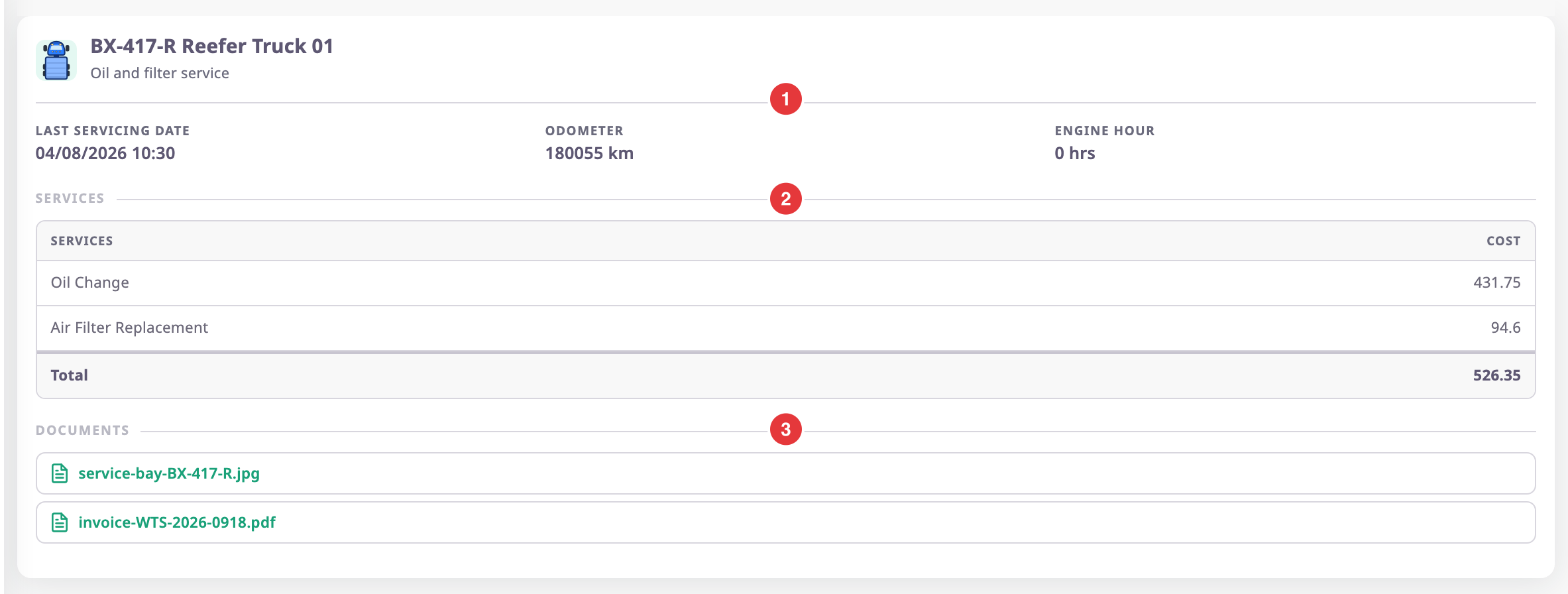
The Service record screen shows one recorded service as a receipt. It lists the unit, the readings, each cost line, the total and the documents. To open it, select Maintenance in the side menu. Select the History icon on a reminder's row. Select the View icon of a service.
The address of this screen holds the id of the completed service, not of the reminder.
¶ Readings and date
The summary, marked 1, shows the unit and reminder, then three values:
| Value | What it shows |
|---|---|
| Last service date | The date and time you entered as Actual service date and time. |
| Odometer | The odometer reading, in km. |
| Engine hours | The engine-hours reading, in hours. |
A reading shows 0 when the reminder does not use that threshold.
¶ Services and total cost
The Services table, marked 2, lists each service type with its Cost. The last row, Total, adds them up. The app shows no currency. A record with no cost lines reads "No services were recorded for this job".
¶ Documents
The Documents list, marked 3, holds the files filed with the service. Select a file name to download it to your computer. The message "Document downloaded successfully" appears. This screen has no preview. A service without files reads "No documents were filed with this job".
¶ Download as PDF
Download exports the reminder's service history as a PDF report.

- Select Download, marked 1.
The export appears on the Tasks tab of the notification bell while the app builds it. - Wait until the export finishes.
The browser downloads the file, named Service history.pdf.
The PDF is the Service history report for this reminder. It lists every service recorded on the reminder, with the readings, the services done and their cost, not only the record on screen. See Report template catalogue.
¶ Permissions
- The screen needs Read on Maintainance.
- Back returns to the history.