Import SIMs when a delivery of cards arrives. You fill one row per SIM in a CSV file, upload it and the app registers them all. A row can also record a first recharge and fit its SIM to a device.
¶ Before you start
- You need SIMS > Add. To fit SIMs to devices you also need those devices in your account.
- Use a CSV file with commas between values. Put a value in double quotes if it contains a comma.
- The server takes a limited number of rows per file. A file with more fails with "Too many rows". Split it into smaller files.
¶ File columns
The first line of the file is the header. Column order and letter case do not matter. The dialog lists the columns under the file area.
| Column | Required | What goes in it |
|---|---|---|
sim_number |
Yes | The SIM number, 5 to 20 characters. Example: 8931000035999000051 |
msisdn |
Yes | The phone number, 5 to 20 characters. Example: 319700000051 |
operator |
Yes | The operator, 2 to 20 characters. Example: KPN |
sim_active_date |
Yes | The activation date, in a form the app can read. Example: 2026-09-01T00:00:00.000Z |
status |
Yes | ACTIVE or INACTIVE. Suspended is not accepted. |
labels |
No | Group names for the SIM, separated by \|. Example: Spare pool|North |
iccid |
No | The ICCID printed on the card: 18 to 22 digits, optionally ending in F. |
imsi |
No | The IMSI: 6 to 15 digits. |
identifier |
No | The unique identifier of a device in your account. The SIM is fitted to that device. |
plan |
No | The plan of a first recharge. Example: M2M 500 MB |
amount |
No | What the first recharge cost. Example: 7.5 |
recharge_date |
No | The date of the first recharge. |
expiry_date |
No | The date the first recharge runs out. This is a date, not a number of days. |
A row with a plan, an amount or an expiry_date gets a first recharge.
¶ Download the sample file
-
In the side menu, select Reference Data > SIM Management.
The SIM list opens. -
Select Import.
The Upload CSV dialog opens.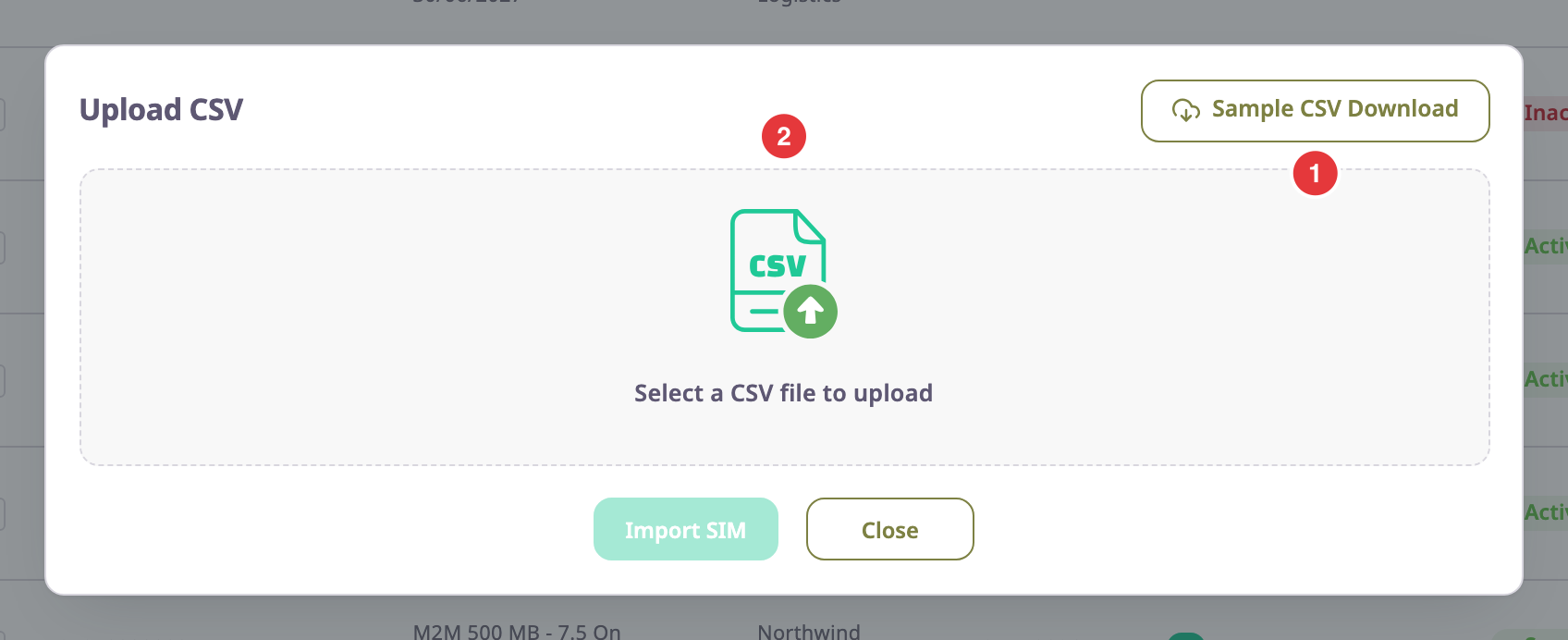
-
Select Sample CSV Download, marked 1.
Your browser saves a file with the header and one example row.
¶ Upload and import
- Fill in the file and save it as CSV.
- In the dialog, select Select a CSV file to upload, marked 2, and choose your file.
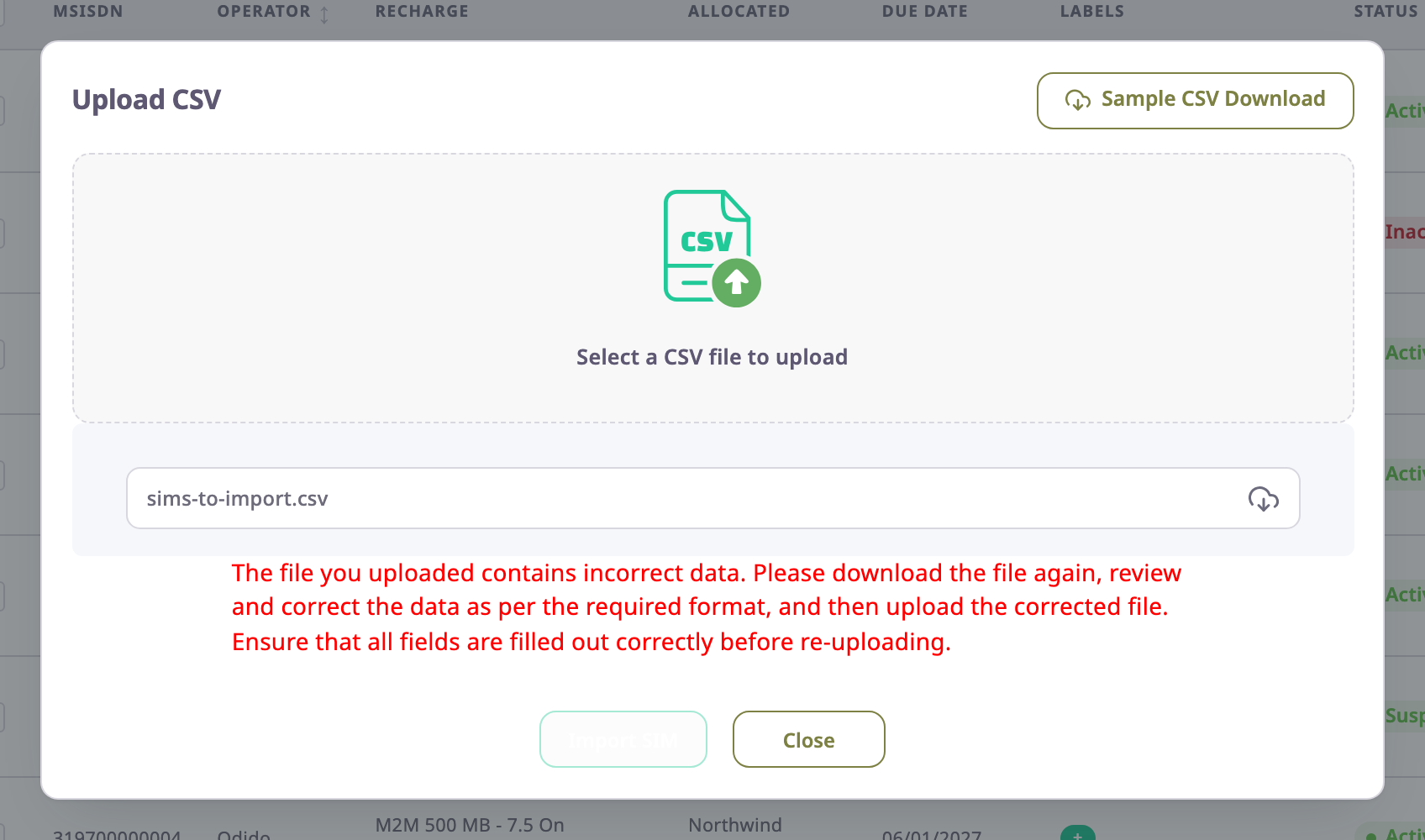
The file name appears. The app checks every row. - Select Import SIM.
The app imports the rows.
Before you import, the app checks each row. It checks the number and operator lengths, the date and the status. It also checks the ICCID and IMSI formats. If any row fails, the dialog says "The file you uploaded contains incorrect data" and Import SIM stays unavailable. Below the message, the dialog lists each failing row by number with its problems, for example "Row 3" and "Status must be ACTIVE or INACTIVE." It shows the first 50 rows and counts the rest. Select the download icon next to the file name to get the file back, fix it and upload it again.
¶ Read the result
- If every row imports, the app shows, for example, "12 SIMs imported successfully" and closes the dialog.
- If some rows fail, the app shows, for example, "12 rows processed: 10 imported, 2 failed." The dialog stays open and lists each failed row with its reason. A second file name beginning with failed_ appears. Select its download icon, Download failed records, to get those rows with an
errorcolumn.
The reasons the server gives are:
| Reason | What it means |
|---|---|
| "A SIM with this SIM number already exists.", "SIM msisdn number already exits" or "A SIM with this ICCID already exists." | Another SIM has that SIM number, MSISDN or ICCID. If the row has an identifier, the existing SIM is still fitted to that device. |
| "Another row in the file has the same SIM number, MSISDN or ICCID" | The file repeats a SIM. Only the first row imports. |
| "A required value is missing or too long" | Fix the value and import the row again. |
| "ICCID must be 18–22 digits, optionally ending in F." | The ICCID is not valid. |
| "IMSI must be 6–15 digits." | The IMSI is not valid. |
| "No device with this identifier is allocated to your account" | No device of your account has that identifier. |
| "SIM is already associated with a device" | The SIM is already fitted to another device. |
| "The device already has a primary and a secondary SIM" | Both slots of the device are taken. |
¶ What happens next
- The imported SIMs are in the SIM list, allocated to the account chosen in the account list above the table.
- Rows with an
identifierare fitted to their device: the first free slot, SIM Number 1 before SIM Number 2. - Rows without recharge columns have no recharge. Record the first one on each. See Record a SIM recharge.