Add a SIM to your inventory before you fit it to a device, so you can track its status and its recharges. To add many SIMs at once, see Import SIMs from a CSV file.
¶ Before you start
- You need SIMS > Add. The built-in Owner role of a dealer account has it.
- Have the MSISDN, the SIM number and the operator at hand. Neither number may exist already in the app, in any account. If you have them, also have the ICCID printed on the card and the IMSI.
¶ Enter the SIM details
- In the side menu, select Reference Data > SIM Management.
The SIM list opens. - Select Add SIM.
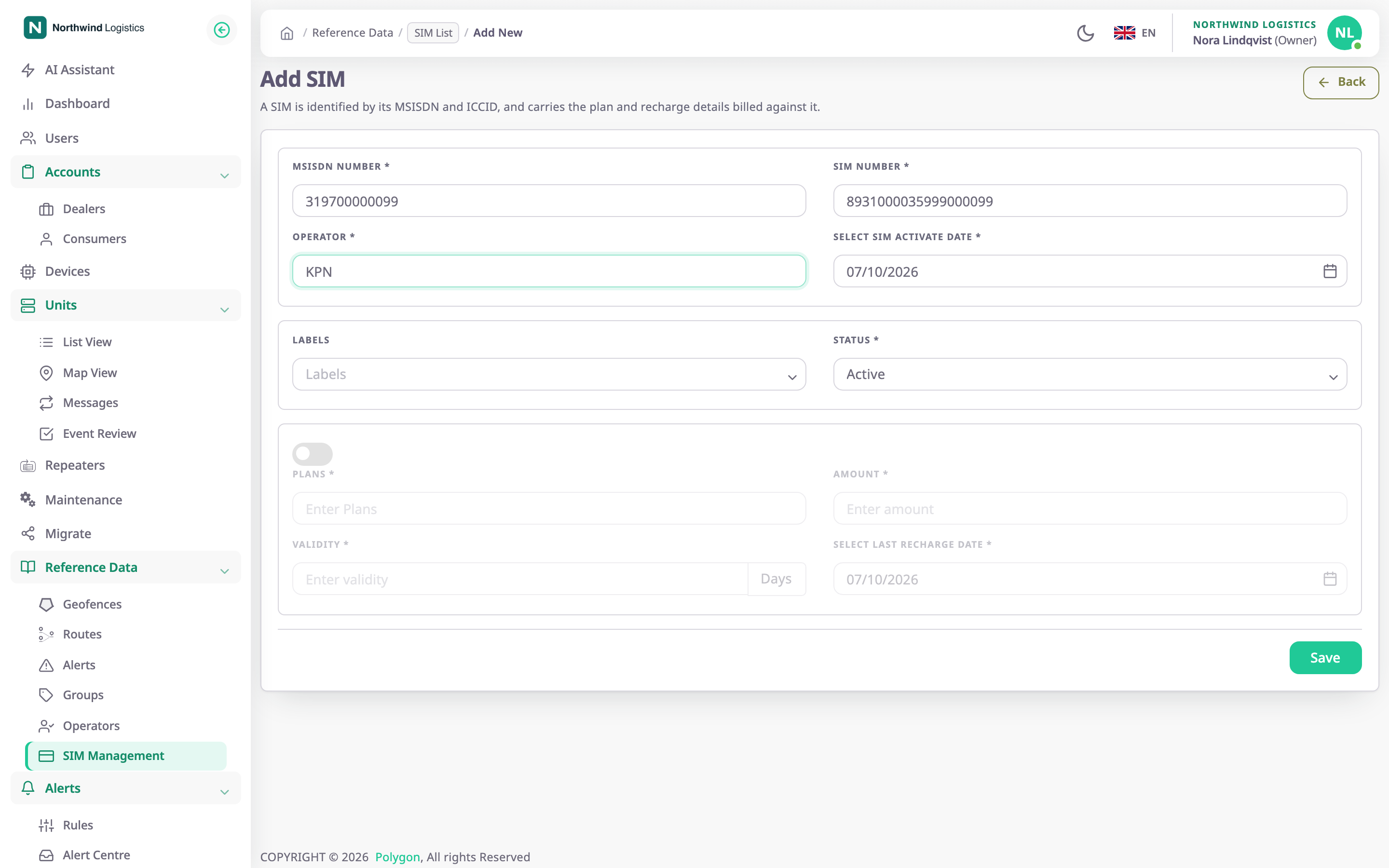
The Add SIM form opens. - In MSISDN Number, enter the phone number, for example 319700000099.
- In SIM Number, enter the SIM number, for example 8931000035999000099.
- In Operator, enter the operator, for example KPN.
- Optional: in Select SIM activate date, change the date. It starts at today.
- Optional: in ICCID, enter the number printed on the card, for example 8991101200003204510.
- Optional: in IMSI, enter the IMSI.
- Optional: in Labels, choose the groups for the SIM.
- Optional: in Status, choose a status other than Active.
¶ Add the first recharge
Skip this section if you record recharges later.
- Turn on the switch above Plans.
The recharge fields become available. - In Plans, enter the plan, for example M2M 500 MB. Without a plan, the app records no recharge.
- In Amount, enter what it cost, for example 7.5.
- In Validity, enter the days the recharge lasts, for example 30.
- In Select Last recharge Date, check the date. It starts at today.
¶ Save the SIM
- Select Save.
The app shows "SIM created successfully" and opens the SIM list. The new SIM is at the top.
If the app shows "SIM already exists", another SIM has that MSISDN or SIM number. If it shows "ICCID already registered", another SIM has that ICCID. Check the number, or find the existing SIM in the list.
¶ What happens next
- The SIM is allocated to your account. Its Allocated column shows your account name.
- The SIM is available to fit to a device. See Fit a SIM to a device.
- Once a fitted device reports the card's ICCID, the SIM details show whether it matches the one you entered. See SIM details.
- With a recharge, the Recharge and Due Date columns fill in. Without one, they stay empty and the SIM never counts as overdue.