One form adds a SIM and edits one. To add a SIM, in the side menu, select Reference Data > SIM Management, then select Add SIM. To edit one, select the Edit icon on its row.
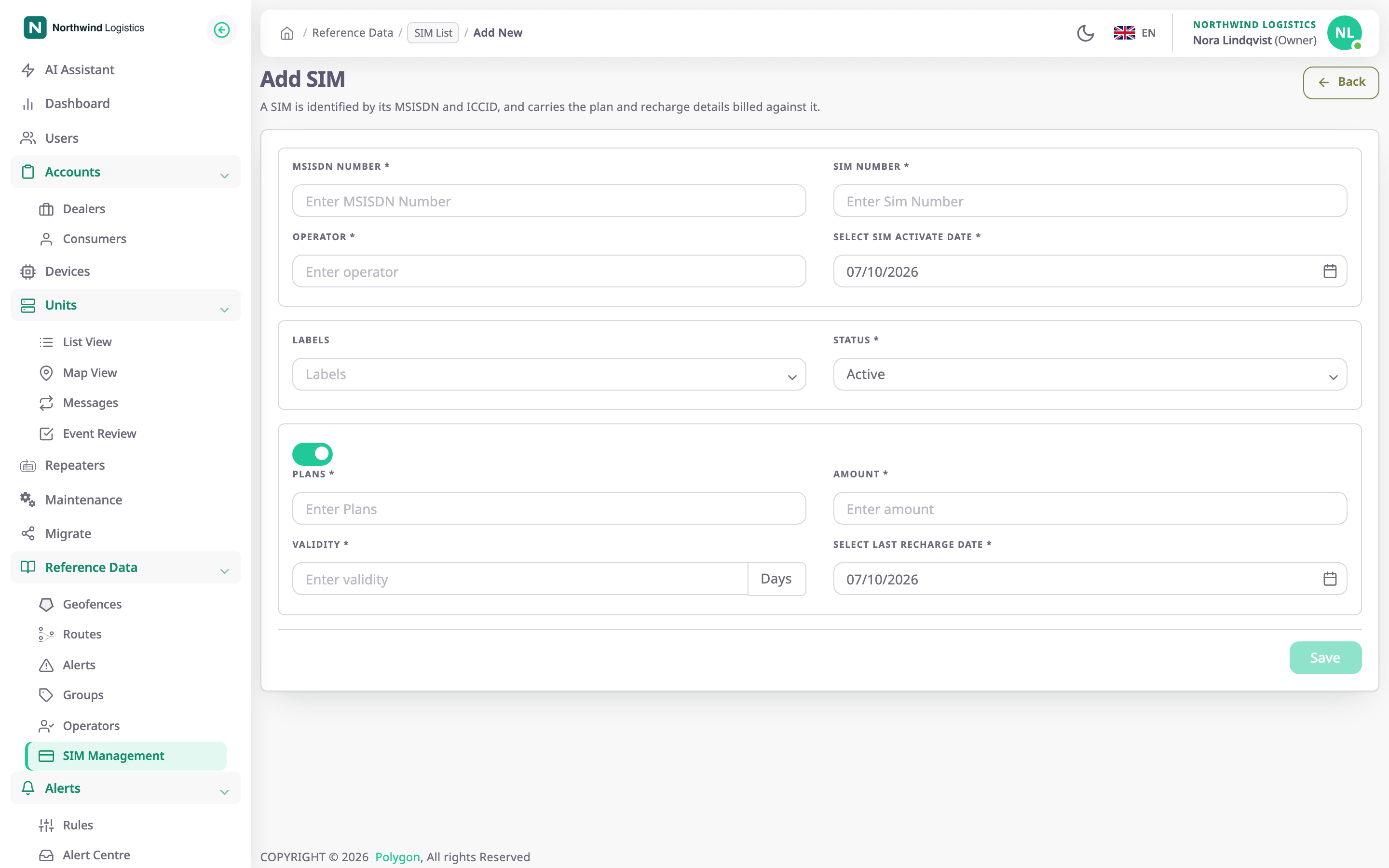
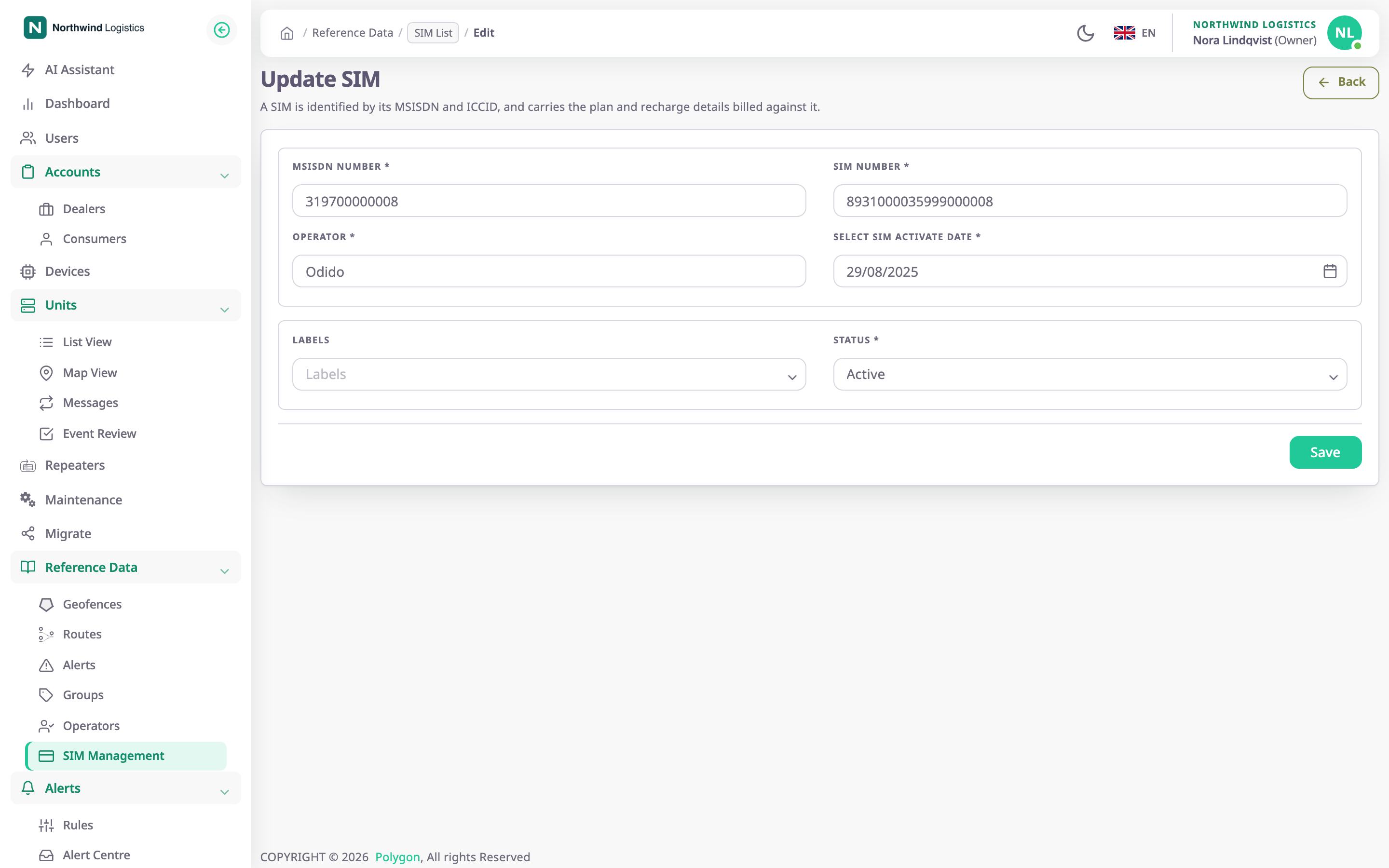
The page title is Add SIM or Update SIM. The lead text reads "A SIM is identified by its MSISDN and ICCID, and carries the plan and recharge details billed against it." Back returns to the previous page without saving.
¶ SIM fields
| Field | Required | What it does | Allowed values / example | Notes |
|---|---|---|---|---|
| MSISDN Number | Yes | The phone number the network knows the SIM by. Shows in the list and on a device the SIM is fitted to. | 5 to 20 digits, at least 10000. Example: 319700000099 | Must be unique among all SIMs in the app, in any account. The field takes digits only. Changing it on a fitted SIM changes the number on the device too. |
| SIM Number | Yes | The SIM's own number. It is the title of the SIM details. | 5 to 20 digits, at least 10000. Example: 8931000035999000099 | Must be unique among all SIMs in the app. |
| Operator | Yes | The mobile operator. Shows in the list and is copied to a fitted device. | 2 to 20 characters. Example: KPN | The app removes spaces at the start and end. |
| Select SIM activate date | Yes | The date the operator activated the SIM. Shows on the SIM details. | A date from the picker | Starts at today. |
| ICCID | No | The number printed on the SIM card. The app compares it with the ICCID the fitted device reports. | 18 to 22 digits, optionally ending in F. Example: 8991101200003204510 | Must be unique among all SIMs in the app. The app removes spaces. On edit, emptying the field clears the stored ICCID. |
| IMSI | No | The subscriber identity stored on the SIM. Shows on the SIM details. | 6 to 15 digits. Example: 404450123456789 | The app removes spaces. |
| Labels | No | The groups the SIM belongs to, for filtering. | Existing groups, or a new name | On edit, the labels you leave in the field replace the old ones. |
| Status | Yes | Whether the SIM is in service. | Active, In Active, Suspended | Active by default. See SIM cards. |
If the MSISDN or the SIM number exists already, saving fails with "SIM already exists". If another SIM has the same ICCID, saving fails with "ICCID already registered". These checks cover every account, so a number held by another dealer also blocks you.
A wrong ICCID shows "ICCID must be 18–22 digits, optionally ending in F." under the field. A wrong IMSI shows "IMSI must be 6–15 digits."
¶ The reported ICCID
A device can report the ICCID of the card inside it. When it does, Update SIM shows that value under ICCID. The line is headed "Reported by device" and carries a status chip:
| Chip | Means |
|---|---|
| Matches device | The ICCID you entered is the one the device reports. |
| Mismatch | The device reports a different ICCID. The card in the device may not be this SIM. |
| Not registered | The device reports an ICCID, but the SIM has none. |
The chip follows what you type, before you save. When ICCID is empty, Use reported ICCID copies the reported value into the field. Select Save to keep it.
¶ First recharge
When you add a SIM, a switch above the recharge fields records a first recharge together with the SIM. The switch has no label. It is off by default and the fields are dimmed. The section is missing when you edit a SIM; recharges are added later from the SIM list or the SIM details. See Record a SIM recharge.
| Field | Required | What it does | Allowed values / example | Notes |
|---|---|---|---|---|
| Plans | No | The plan name. Shows in the Recharge column. | Any text. Example: M2M 500 MB | The label shows a marker, but the form accepts it empty. Without a plan, the app records no recharge at all. |
| Amount | No | What the recharge cost. | 0 or more, optional decimals. Example: 7.5 | — |
| Validity | No | How many days the recharge lasts. | Whole days, with a Days suffix. Example: 30 | The due date is the recharge date plus these days. |
| Select Last recharge Date | No | The day the recharge was made. | A date from the picker | Starts at today. |
If the recharge date is earlier than the activation date, the app does not save. It shows "The recharge date cannot be earlier than the SIM activation date".
¶ Buttons and actions
| Action | What happens |
|---|---|
| Save | Saves the SIM. The app shows "SIM created successfully" or "SIM updated successfully" and returns to the SIM list. The button stays unavailable until every required field is valid. |
| Back | Returns to the previous page. The app saves nothing. |
¶ Permissions
- To add a SIM you need SIMS > Add. To edit one you need SIMS > Edit. The server checks both when you save.
- The Add SIM page opens for any signed-in user. Only a dealer account has the SIMS module, and saving needs Add.
- The built-in Owner role of a dealer account has both.