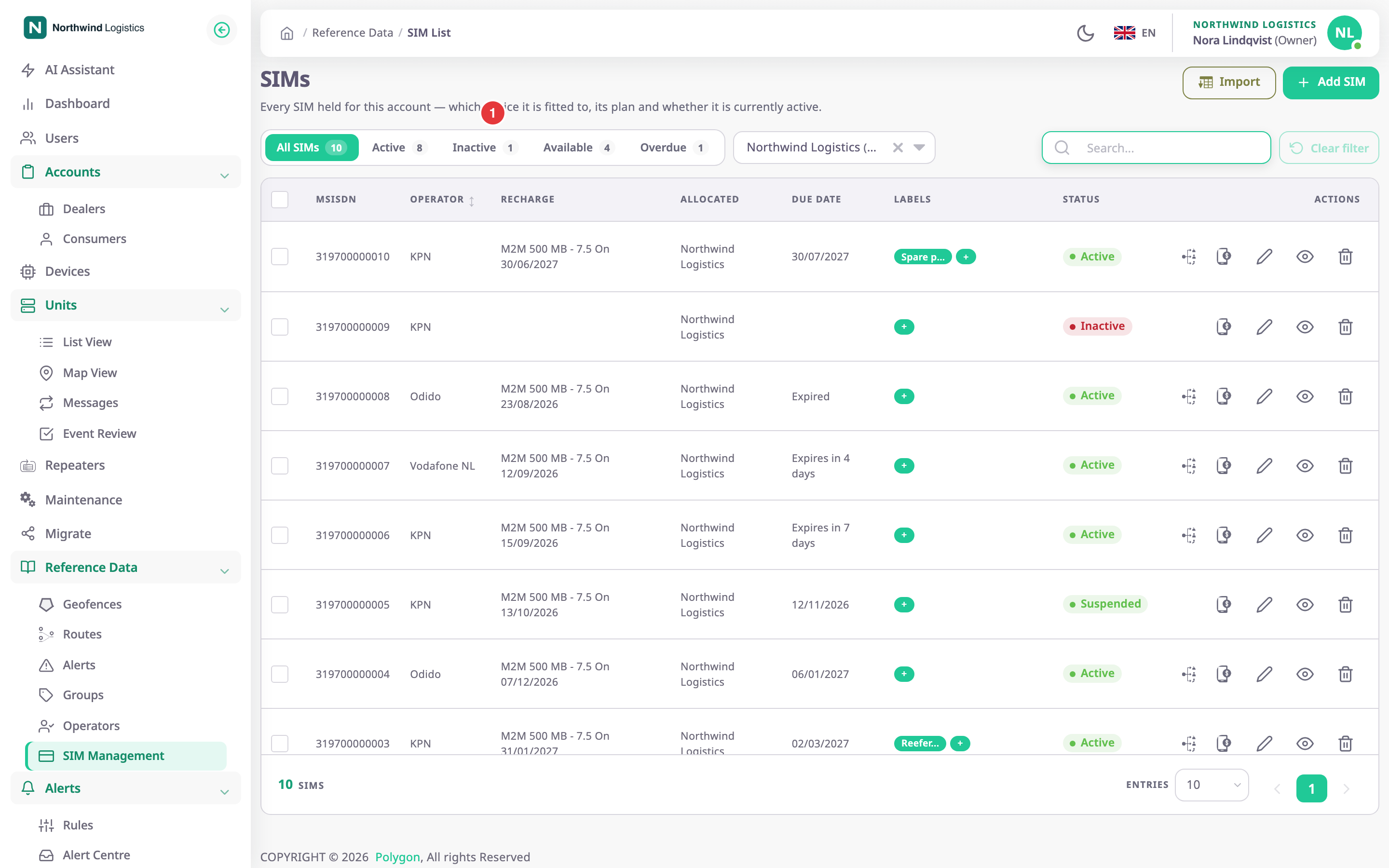
A SIM record is your inventory entry for one SIM card: its phone number, its network operator, its status and its recharge history. In the SIM Management screen you register SIM cards, track when each one needs a recharge and hand them to sub-accounts. To open it, in the side menu, select Reference Data > SIM Management.
¶ What a SIM record is
A record holds the MSISDN, which is the phone number the network knows the SIM by. It also holds the SIM number, the operator, an activation date, a status and optional labels. It can also hold the ICCID printed on the card and the IMSI. Recharges are separate entries under the SIM. Each one has a plan, an amount and a validity in days.
The SIM list and every SIM screen are for dealer accounts. A consumer account that opens the page gets "Un-authorized action". A consumer sees the SIM numbers of its devices only on the device itself, if its role allows it.
¶ SIMs, devices and accounts
Two words matter on these pages.
- Allocated means an account holds the SIM. The Allocated column of the list names that account. You allocate SIMs down your account tree, never up and never to a consumer account.
- Fitted means the SIM is in a device's SIM Number 1 or SIM Number 2 slot. A SIM fitted to a device cannot be allocated to another account or deleted until you take it out of the device.
A device holds at most two SIMs. To fit a SIM, see Fit a SIM to a device.
¶ Checking the ICCID
A fitted device can report the ICCID of the card inside it. The app compares that value with the ICCID you registered on the SIM. The SIM details and the SIM form show the result: "Matches device", "Mismatch", "Not reported" or "Not registered". A mismatch means the card in the device may not be the SIM you think it is. When the SIM has no ICCID yet, Use reported ICCID copies the reported one. See SIM details.
¶ Statuses and the status filter
Every SIM has one of three statuses: Active, Inactive or Suspended. The row of segments above the list filters by them, and each segment shows a count:
| Segment | Shows |
|---|---|
| All SIMs | Every SIM the account holds, in any status |
| Active | SIMs with status Active |
| Inactive | SIMs with status Inactive |
| Available | SIMs that are not fitted to any device |
| Overdue | Active SIMs whose latest recharge has run out |
Suspended SIMs show in All SIMs only. The counts follow the account chosen next to the segments.
¶ Recharges and due dates
Record each top-up on the SIM. The latest recharge sets the Due Date in the list: the recharge date plus its validity. When that date has passed, the list shows "Expired" and the SIM counts as overdue. When it is less than four weeks away, the list says "Expires in" and the time left. Otherwise it shows the date.
¶ SIM alerts and reports
Alert rules can watch SIM cards with three rule templates:
- "SIM card changed" fires when a device reports a different card than before in the same slot.
- "Unregistered SIM card" fires when a device reports a card that is not registered to it.
- "SIM plan expiring" reminds you before a fitted SIM's recharge runs out, and once it has.
See Create an alert rule.
Reports have SIM templates too: "SIM expiry", "SIM recharge history", "SIM device allocation" and "SIM mismatches". See Report template catalogue.
¶ Who can manage SIMs
The SIMS module of a dealer account has these permissions:
| To | Permission |
|---|---|
| See the menu entry, the list and the details | Menu and Read |
| Add or import SIMs | Add |
| Edit a SIM, change status, change labels, allocate, use a reported ICCID | Edit |
| Delete SIMs | Del |
| Record recharges, and delete them from the history | Recharge Manage |
The built-in Owner role of a dealer account has all of them. See Permissions reference.