Every account sits in a tree. Your account is the top of your part of it, and you work with the accounts beneath it.
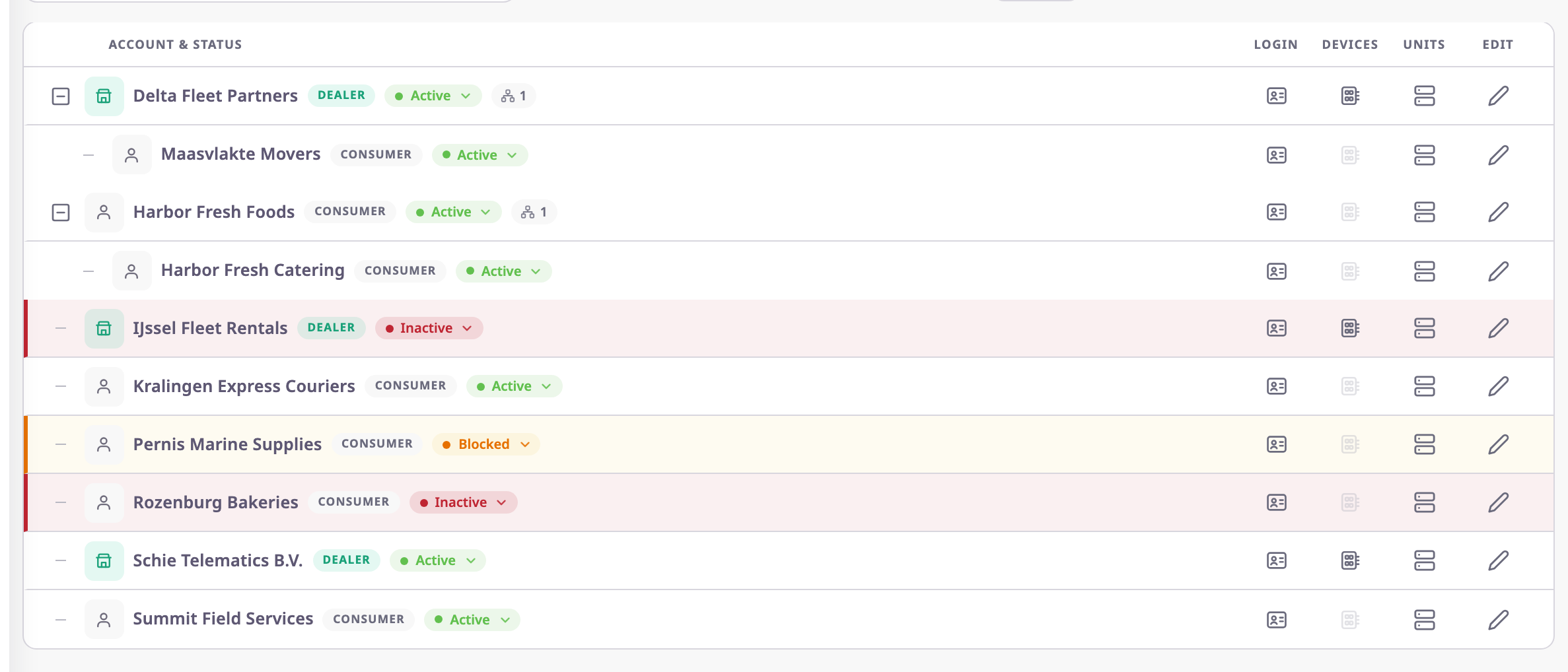
¶ Dealer and consumer accounts
| Account type | What it is for | Accounts it can create |
|---|---|---|
| Dealer | A company that sells and supports tracking for others. It owns the devices and hands units to its customers. | Dealer accounts (sub-dealers) and consumer accounts |
| Consumer | A company that tracks its own fleet. | Consumer accounts only (sub-consumers) |
Nobody can change an account's type after its parent creates it. A consumer account cannot create a dealer account.
¶ Sub-accounts and how deep the tree goes
A sub-account is any account created by another account. The creator is its parent. In the picture, Delta Fleet Partners is a sub-dealer of Northwind Logistics and has its own consumer, Maasvlakte Movers. Harbor Fresh Foods is a consumer with a sub-consumer, Harbor Fresh Catering.
The app refuses a new account more than 100 levels below the top of the tree.
¶ What a parent account can see and do
Users of a parent account, with the right permissions, can:
- see every account below theirs in the Account Tree View and in the Dealers and Consumers lists;
- edit an account's details, formats and branding;
- set an account to ACTIVE, INACTIVE or BLOCKED;
- see and manage the users and invitations of an account;
- sign in as a user of an account below theirs to help them.
They cannot change an account's type, and they do not become users of the account.
Units and devices reach an account through allocation, which the Devices and Units sections describe.
See Allocate a device.
To give a unit to a customer account, see Allocate a unit.
¶ Restricting sub-accounts
Restrict Sub Accounts on an account stops it from creating accounts below it. Its users also lose the Dealers and Consumers screens, whatever their role says. Only the parent account can turn it on or off.
¶ Account status
| Status | What it does |
|---|---|
| ACTIVE | Users can sign in and work in the account. |
| INACTIVE | Users cannot work in the account. It disappears from their account picker at sign-in. |
| BLOCKED | The same as INACTIVE today. The app makes no difference between the two. |
A status also covers everything below the account. If a parent account is not active, users of its sub-accounts cannot work either. The app refuses them with an "Account Inactive" message.
A new account is always ACTIVE. Only its parent can change its status.
¶ Business and personal accounts
Is Legal Entity marks an account as a registered business. The account lists show it as Business, otherwise as Personal. A business account needs a Registration Number that no other account has.
¶ White labelling down the tree
An account may have its own theme colour, four logos and default language. A parent account that may white-label decides, with Allow White Labelling, whether a child account may do the same. An account without its own logos shows the logos of the account above it.
See Set up white labelling for an account.