A reminder tells you before a unit needs its next service. You set a distance, an engine-hours count, a date, or all three. The first threshold to arrive makes the reminder due.
¶ Before you start
- You need Add on Maintainance. The Owner role has it. The list also needs Notification Settings, as Maintenance reminders list explains.
- Your account must have the unit allocated. See Allocate a unit.
- For a distance or engine-hours threshold, the unit needs an odometer or engine-hours sensor. Without one, only the date threshold works.
- Know the unit's last odometer and engine-hours readings and the date of its last service.
¶ Choose the unit and name the service
-
In the side menu, select Maintenance.
The Reminders list opens. -
Select Add reminder, marked 1.

The Create service reminder form opens, set to One unit.
-
In Unit, marked 1, type part of the unit's name.
-
Choose the unit in the list.
The odometer and engine-hours sections become available if the unit has those sensors. -
In Service name, marked 2, enter Reefer cooling check.
-
Optional: in Labels, marked 3, choose one or more groups.

To give several units the same reminder, select Several units or groups before step 3. Then choose units in Units, groups in Groups, or both. See One unit or several.
¶ Set the thresholds
Switch on each threshold you want. By date is always on.
-
To remind by distance, select By odometer, marked 1.
-
In Interval, km, enter the distance between services, for example 15000.
-
In Odometer at last service, km, enter the reading at the last service, for example 100000.
-
In Sensor, choose the odometer sensor.
-
To remind by engine hours, select By engine hours, marked 2. Fill in Interval, engine hours, Engine hours at last service and Sensor the same way.
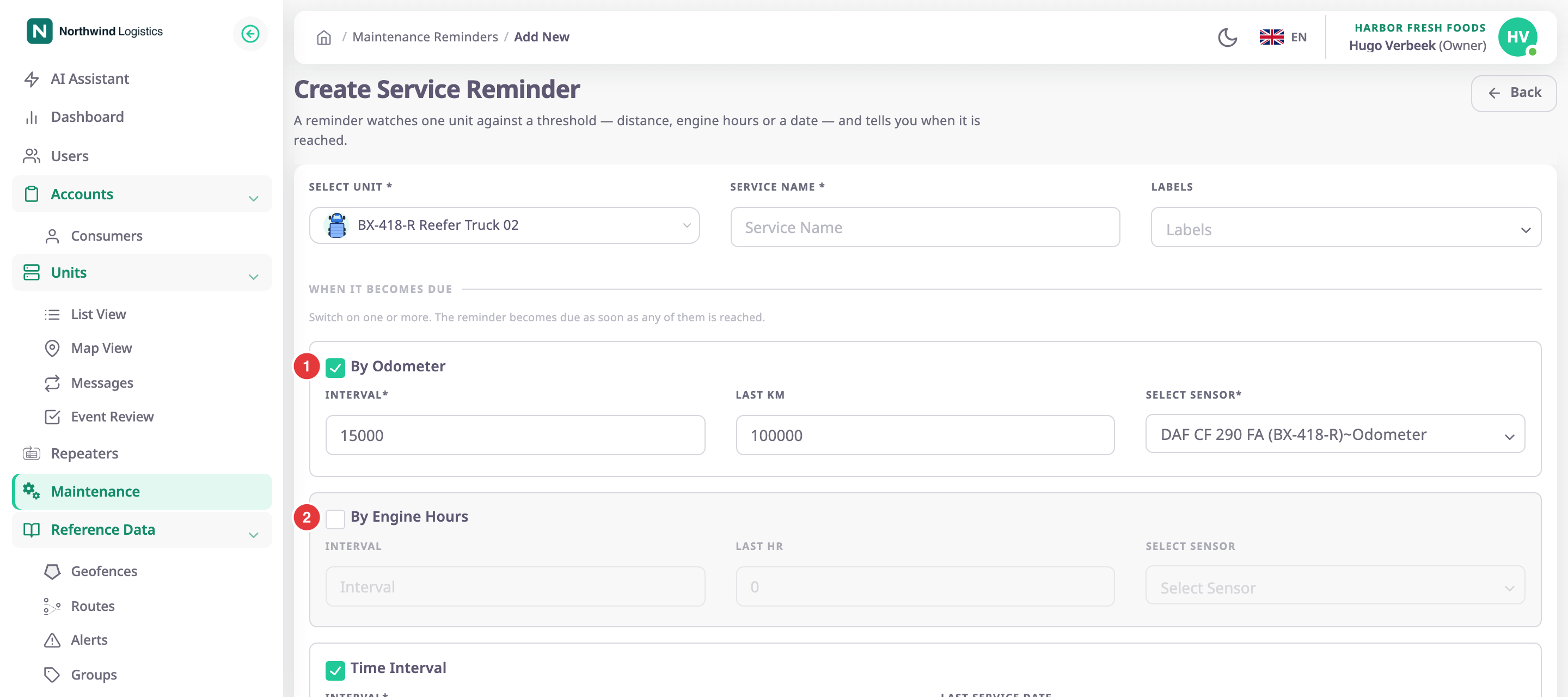
-
In By date, select the Due date field.
A calendar opens. -
Choose the day the service is due, set the hour and minute, and select Apply.
The field shows the date and time, for example 16/11/2026 08:00. Typing in the field has no effect. -
Optional: in Last service date, choose when the unit was last serviced the same way. It must be earlier than Due date.
¶ Make it repeat
Optional. With a repeat, the due date moves on by itself each time you record a service.
- Select Repeat.
- In Every, choose Day, Week, Month or Year.
- Enter the number of days, months or years. For Week, select a weekday button instead.
A line below shows the rule and the next due date if you serviced the unit today.
¶ Choose the services covered
- In Select services, choose one or more service types, for example Air Conditioning Service.
Each type appears as a chip. These types become the lines of the bill when you complete the service.
¶ Set the notice times
Optional. Leave both lists empty to use the account default.
- In First reminder, choose Seven Days, Fifteen Days or Thirty Days.
- In Second reminder, choose Same Day or OneDay Before.
¶ Save the reminder
- Select Save Changes.
The message "Service reminder created" appears. If your role can add alert rules, the app checks whether a rule already notifies about this unit. - If the dialog "Get notified about this service?" opens, select Set up notification to build the rule now, or Not now.
Not now opens the list with your new reminder, with the status Upcoming.
If Save Changes stays unavailable, check three things. You chose a unit. You entered a name. Every threshold you switched on has all its fields and a sensor.
With Several units or groups, the Result panel opens instead. It lists the units the app skipped and why.
¶ What happens next
- The reminder shows Upcoming until a threshold arrives. Then it shows Due.
- An alert rule on the Service reminder template turns the notice times into incidents and messages. See Get an alert when a service is due.
- When the workshop finishes, record the service. See Record a completed service.