Add an operator for each driver. The record lets you assign the driver to a unit and see their name in lists, reports and alerts.
¶ Before you start
- You need the Operators > Add permission. The Owner role has it.
- Decide the driver's code if drivers use cards or tags. See Identify drivers automatically.
¶ Add the operator
- In the side menu, select Reference Data > Operators.
The operators list opens. - Select Add Operator.
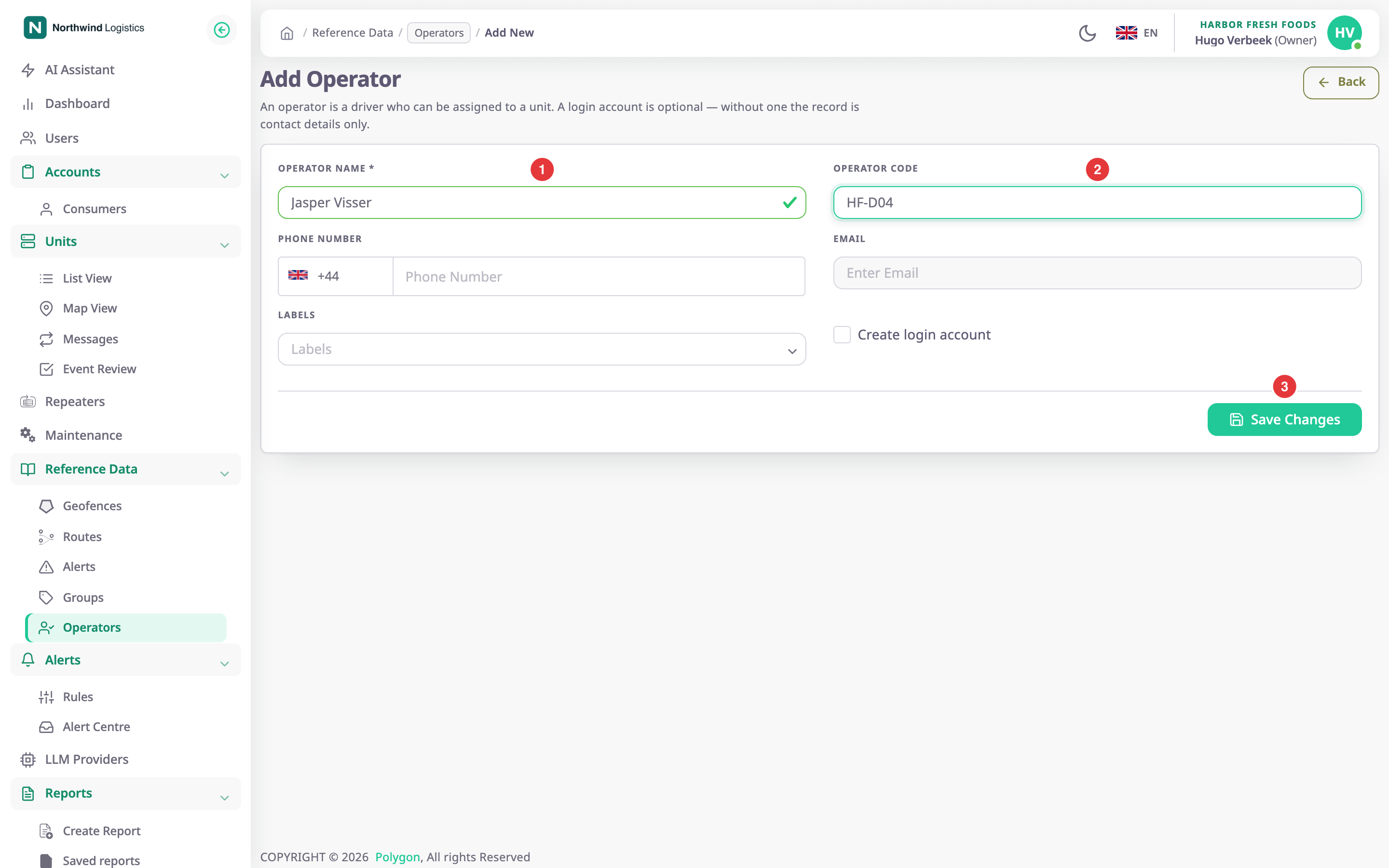
The Add Operator form opens. - In Operator Name, enter Jasper Visser, marked 1.
- Optional: in Operator Code, enter HF-D04, marked 2. See Choose an operator code below.
- Optional: in Phone Number, choose the country and enter the number.
- Optional: in Labels, choose or type the groups the driver belongs to.
- Select Save Changes, marked 3.
The message "Operator created successfully" appears and the list shows the new operator.
¶ Choose an operator code
Use a code that is short and cannot repeat: 3 to 20 characters, unique across all operators. If a driver uses a card or a tag, the code is what the reader sends, so it must match exactly. For drivers you assign by hand, any readable code works, such as the driver's staff number.
¶ What happens next
The operator is in the list with no unit. To put the driver on a unit, see Assign a driver to a unit. To let the driver sign in, see Give a driver a login.