A unit shows two kinds of status in Polygon. The record status says whether the unit is in service. The movement state says what the unit is doing now. They are independent: a unit with the record status Active can be Offline.
¶ Record status
The record status is the Status field of the unit. It records whether the unit is in service. You set it in the unit form, and the Status column of the units list shows it.
The values are Active, Inactive, Damaged and Blocked. Active is the default.
The record status does not stop tracking. It is not the state you see on the map. See Unit form and Units list.
¶ Movement state
On the map, every unit has one movement state. The status buttons at the top of the map show how many units are in each state. Select a button to list only those units.

| State | What it means |
|---|---|
| Running | The ignition is on and the unit is moving. The row shows the speed. |
| Idling | The ignition is on and the unit is standing still. |
| Parked | The ignition is off. |
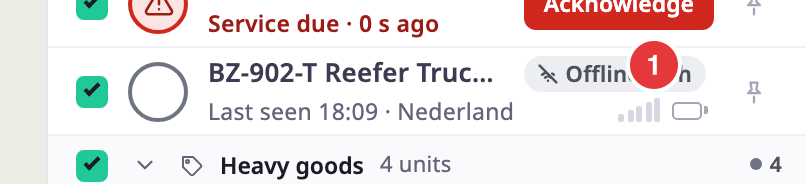
| Offline | The unit has sent nothing for longer than its offline time. The row shows how long ago. |
The state comes from the unit's ignition and idle sensors, so the device needs an ignition sensor. If a unit has no state from the server, the map shows it as Running when its last speed was above 3 km/h, and as Parked otherwise.
Silence beats everything else. Once a unit has sent nothing for longer than its offline time, the map shows it Offline, whatever its last state was. The offline time is Offline after on the unit form, or 15 minutes when that field is empty. See Unit form fields. The app updates the state as new messages arrive, so you do not need to refresh.
¶ Alarm and archived units
Two pills replace the movement state in the unit list.
| Pill | What it means |
|---|---|
| Alarm | The unit has an open alert incident. The pill shows how long ago it opened. The row also shows Acknowledge if you may acknowledge it. |
| Archived | Your account's allocation of the unit has ended. The row shows the date and says the history is kept. An archived unit is not plotted on the map. |
The status buttons count a unit by its movement state, not by these pills. See Respond to a live alert on the map.
¶ Signal and last activity
On the map, a row shows five signal bars. More filled bars mean a stronger signal from the unit's GSM sensor. Bars are grey and empty while the unit is Offline. Without a GSM sensor, the signal is unknown.
In the units list, the Last activity column shows a signal icon and when the unit last sent a message. The icon's tooltip says Connected if a message arrived in the last 5 minutes, otherwise No signal.
¶ Battery level
The battery symbol, marked 1 in the picture, shows the unit's supply. For a vehicle with a 12 V or 24 V supply, the symbol shows a low battery when the voltage is low: under 11.9 V on a 12 V system, and under 23.6 V on a 24 V system. For a unit that reports a percentage, it does so under 20 percent. It is empty while the unit is Offline or reports no value.
¶ Archived and allocated units
A unit that your account owns but has allocated to another account shows "Allocated to" and the account name on its row. See Unit Allocation dialog.