An alert rule watches your units and tells you when something needs attention: a truck speeds, a reefer warms up, a van leaves the depot. Each time a rule's condition comes true, the app opens an incident and sends it to the people and systems you chose.
¶ What an alert rule does
A rule combines four choices:
- A template, which decides what the rule watches, for example Speeding or Geofence exit. The app has 97 templates in ten families.
- The units it applies to: single units, groups, or all units.
- How it fires: how long the condition must last, whether it repeats, and its severity (info, warning or critical).
- Its actions: who hears about it and how, and what else happens, such as a webhook call.
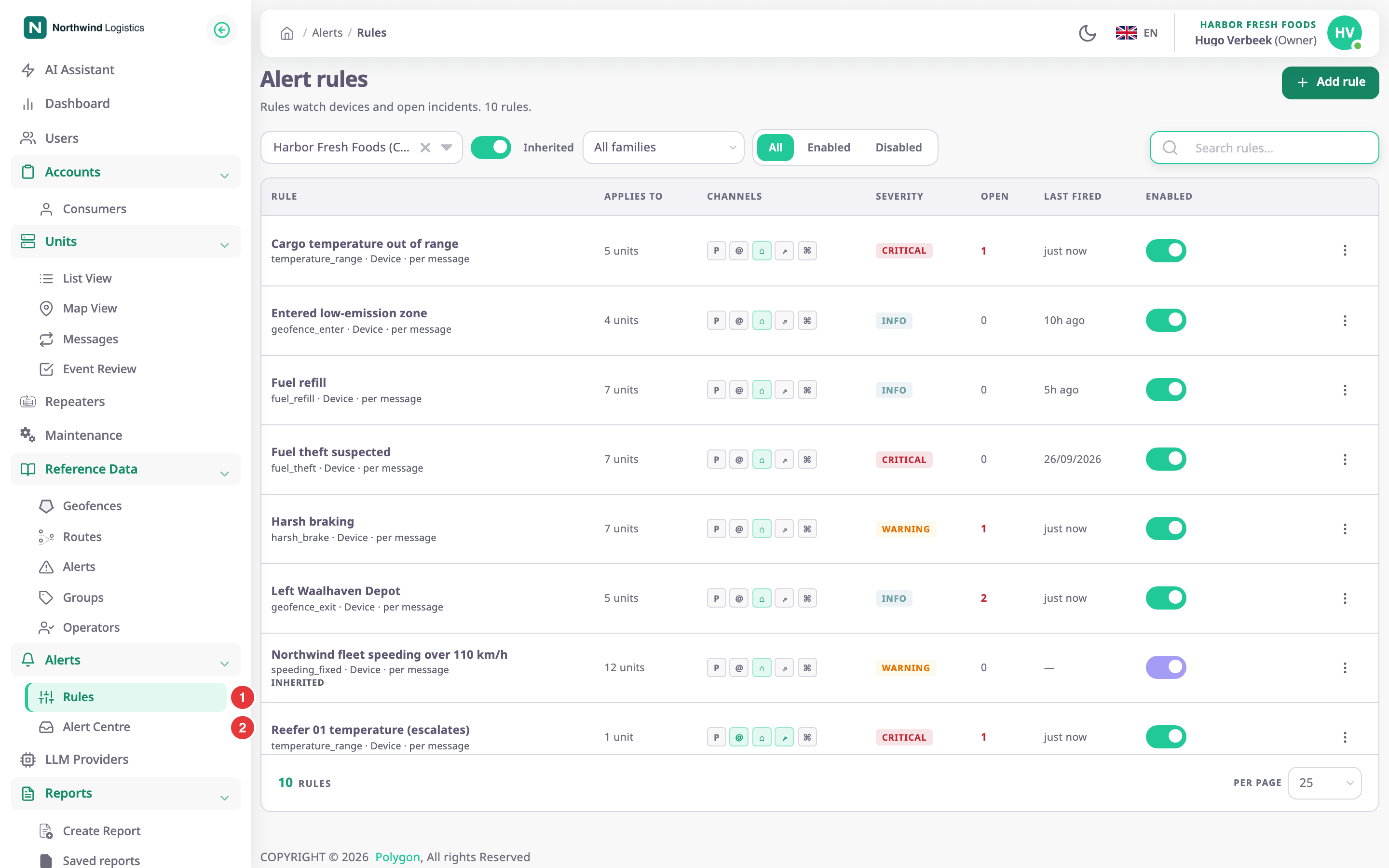
You manage rules in Alerts > Rules, marked 1.
¶ Rules, incidents and notifications
| Term | What it is |
|---|---|
| Rule | The definition: what to watch, on which units, and what to do. |
| Incident | One occurrence of a rule on one device or unit. It stays open until the condition clears, or until someone resolves it. |
| Notification | One delivery of an incident to one person on one channel, such as a push message or an email. |
One rule can have many incidents at once, one per device or unit. A rule that repeats while its condition stays true sends more notifications for the same incident; it does not open new ones.
See How alert rules fire and clear.
¶ Where alerts show up
- Alert Centre, marked 2: every open, acknowledged and past incident of your account, live.
- The bell at the top of the screen: your open and acknowledged incidents.
- Push notifications in the browser, if you turned on Notifications in your profile.
- Email, to users of your account or to outside addresses.
- The Events tab on the map, which lists the incidents a unit raised next to its other events.
- Your own systems, through a webhook.
- A chat in the MAX messenger.
Which channels reach you also depends on your own alert preferences.
See Alert preferences.
¶ Who can do what
What you see depends on your role. The Owner role has every permission below.
| To | You need |
|---|---|
| See Rules | Alert Rules with Read |
| Create, copy or test rules | Alert Rules with Add |
| Change or switch off rules | Alert Rules with Edit |
| Delete rules | Alert Rules with Del |
| See the Alert Centre and incidents | Alert Incidents with Read |
| Acknowledge and resolve incidents | Alert Incidents with Edit |
| Change your own alert preferences | Alert Preferences with Read and Edit |
¶ Tasks in this section
- Create an alert rule
- Escalate an alert nobody acknowledges
- Test a rule on past data
- Turn off, copy or delete an alert rule
- Acknowledge and resolve incidents
- Silence alerts at night or mute a rule
Reference pages: Alert rules list, Alert rule form, Alert channels, recipients and escalation, Alert rule template catalogue, Alert Centre, Incident details.